
Easy Storage
Java mod listed for Minecraft 26.x. Downloads from the MC Java Mods app on Android.
Connect any number of chests to one searchable storage display. Browse, sort, deposit, extract, and automate item input with hoppers.
⬇ Download on Modrinth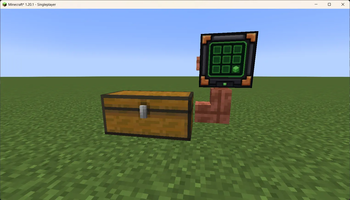
Easy Storage
One display. Any number of chests. No more inventory chaos.
Easy Storage adds a simple connected storage system built around only two blocks: Storage Pipes and the Storage Display. Connect your chests, open the display, and manage the entire network from one searchable interface.
Features
- Connect single chests and double chests through Storage Pipes
- No fixed chest limit for a network
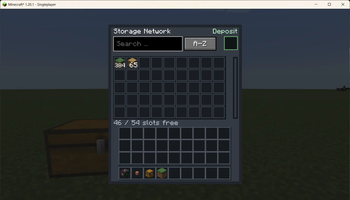
- Browse every stored item from one display
- Search by item name or item ID
- Scroll through large storage networks
- Sort alphabetically or by item amount
- Each display remembers its last sorting mode
- Compact amounts such as
1kand1M, with the exact amount shown in the tooltip - See free slots and total slots at a glance
- Insert and extract items directly through the display
- Smart insertion fills existing stacks before using empty slots
- Shift-click items from your inventory for quick storage
- Feed items into the system automatically with hoppers connected to the display
- Full support for item metadata, durability, enchantments, and custom NBT variants
How to use
- Place your chests.
- Connect them with Storage Pipes.
- Attach a Storage Display to the same pipe network.
- Right-click the display to open the storage interface.
Controls
- Left-click a stored item: extract up to one stack
- Right-click a stored item: extract one item
- Shift-click an inventory stack: insert it into the network
- Deposit slot: place items into the highlighted input slot
- Sort button: switch between alphabetical and amount sorting
- Search field: filter by translated item name or registry ID
Hoppers can insert items into the Storage Display from any side. If the connected chests are full, the item remains safely buffered inside the display until space becomes available.
Crafting
Storage Pipe — creates 8
Copper Ingot | Copper Ingot | Copper Ingot
Glass        | Glass        | Glass
Copper Ingot | Copper Ingot | Copper Ingot
Storage Display
Iron Ingot | Redstone  | Iron Ingot
Redstone   | Glass Pane| Redstone
Iron Ingot | Redstone  | Iron Ingot
Requirements
- Minecraft Java Edition 1.20.1
- Fabric Loader 0.16.x
- Fabric API
- Java 17 or newer
Easy Storage must be installed on both the client and server when playing multiplayer. The network has no configured chest cap, but only chests in currently loaded chunks are accessed.
License
Easy Storage is available under the MIT License.
This is an unofficial Minecraft mod and is not affiliated with or endorsed by Mojang or Microsoft.
- Edition: Minecraft Java
- File type: .jar
- Minecraft version listed: 26.2
- How to install: Install the matching mod loader (Forge, Fabric or NeoForge) for your Minecraft version. → Download the .jar. → Put it in the .minecraft/mods folder and launch that loader profile.
- Where to get it: Opens on Modrinth — not every file is mirrored on our own servers.
Install steps are the general flow for this file type — How to install Minecraft Java mods & modpacks walks through it step by step.
- Ships as easy-storage-1.4.0+26.2.jar — drop this file into the mods folder
- Download size: 319 KB
- Download link checked 15 Oct 2026 — working
These come from our own check of the pack file, not from the source page.