
UI Safe Zone
Keep your UI centered, so your eyes don't have to travel across an ultrawide screen.
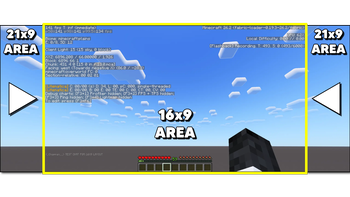
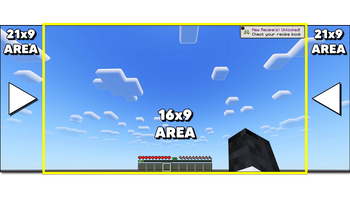
On an ultrawide monitor, HUD elements and menus render at the true edges of your display - meaning your eyes have to travel a long way just to check the chat, glance at a toast, or read your coordinates. UI Safe Zone pulls that UI inward into a centered 16x9 zone, so you're not peeking so far off to the side of the screen.
It's a visibility and comfort upgrade for anyone playing on an ultrawide - no resolution change, no black bars, nothing about the game world itself is touched.
What it does
- Chat - both the message history and the input box are pulled in from the edge
- Toasts - achievement and recipe popups no longer spawn off in the far corner of your display
- F3 debug screen - coordinates and debug info stay close and readable instead of hugging the true screen edges
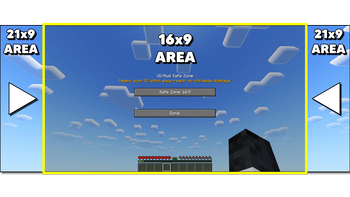
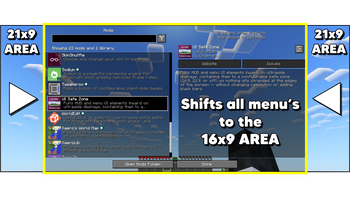
- Menus - the main menu, pause menu, ModMenu, and virtually any other mod's config/settings screen are centered automatically (this isn't hardcoded per-mod - it works on the base screen class every mod's GUI is built on)
What it leaves alone
- The hotbar, health bar, and hunger bar - already centered on screen by default, so there's nothing to fix
- Inventory, chest, crafting, and other container-style screens - small dialogs that already self-center and don't extend near the real screen edges
Modes
Choose between Off, 16:9, and 21:9 depending on how tight you want the zone. Switch anytime - no restart, no reopening menus.
How to configure
- Through Mod Menu, if installed
- A Set keybind you can assign in Controls
- Slach commands:
/safezone,/hud, or/ui- all three do the same thing (off,16x9,21x9, ormenuto open the settings screen)
A bonus for content creators
The same effect that keeps UI within easy reach also happens to keep it within a 16:9 or 21:9 crop - so if you play on ultrawide but record or stream at a narrower aspect ratio, viewers stop losing chat, toasts, and menus off the edges of the frame. A welcome side effect if that's your setup.
- Edition: Minecraft Java
- File type: .jar
- Minecraft version listed: 26.2
- How to install: Install the matching mod loader (Forge, Fabric or NeoForge) for your Minecraft version. → Download the .jar. → Put it in the .minecraft/mods folder and launch that loader profile.
- Where to get it: Opens on Modrinth — not every file is mirrored on our own servers.
Install steps are the general flow for this file type — How to install Minecraft Java mods & modpacks walks through it step by step.
- Ships as ui_safe_zone-26.2-0.2.4.jar — drop this file into the mods folder
- Download size: 250 KB
- Download link checked 5 Sept 2026 — working
These come from our own check of the pack file, not from the source page.