
ShowMyMods
Java mod listed for Minecraft 1.21. Downloads from the MC Java Mods app on Android.
⬇ Download on Modrinth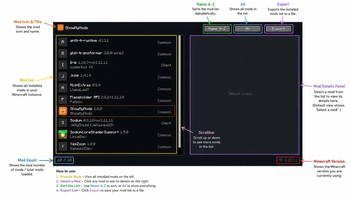
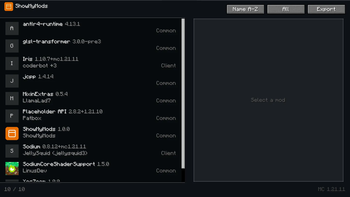

ShowMyMods is a lightweight Fabric mod that adds a dedicated menu for viewing all installed mods in your Minecraft instance. It is designed for players who simply want a clean and fast way to see which mods are installed without the extra features found in larger mod menu mods.
The mod displays each installed mod with its name, version, author, and environment, while also allowing you to sort the list alphabetically and export it when needed. It does not include configuration screens, mod customization, update checking, or other advanced management features, keeping the interface simple and easy to use.
Built with performance as the main priority, ShowMyMods has minimal resource usage and is ideal for ultra low-end PCs, ensuring a smooth experience even on older hardware. If all you need is a fast and lightweight way to view your installed mods, ShowMyMods is the perfect choice.
- Edition: Minecraft Java
- File type: .jar
- Minecraft version listed: 1.21.11
- How to install: Install the matching mod loader (Forge, Fabric or NeoForge) for your Minecraft version. → Download the .jar. → Put it in the .minecraft/mods folder and launch that loader profile.
- Where to get it: Opens on Modrinth — not every file is mirrored on our own servers.
Install steps are the general flow for this file type — How to install Minecraft Java mods & modpacks walks through it step by step.
- Ships as showmymods-1.0.0.jar — drop this file into the mods folder
- Download size: 70 KB
- Download link checked 15 Oct 2026 — working
These come from our own check of the pack file, not from the source page.