
Hold My Button!
Turn any Minecraft control into a toggle: press once to hold it, press again to release it. Configure multiple keyboard and mouse hold bindings in-game.
⬇ Download on Modrinth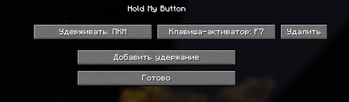

Description (English)
Hold My Button
Turn any Minecraft control into a convenient toggle.
Choose a Minecraft key or mouse button to hold, then assign an activator key. Press the activator once to keep the selected control held; press it again to release it.
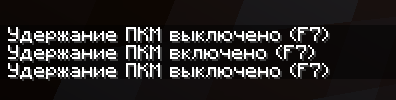
For example, bind Right Mouse Button to F7: pressing F7 starts holding right-click, and pressing F7 again releases it.
Features
- Configure multiple independent hold toggles in-game.
- Supports keyboard keys and mouse buttons.
- Works with any Minecraft action already bound to the selected key, including attack, use, movement, jump, sneak, and sprint.
- Displays a chat message whenever a hold is enabled or disabled.
- English and Russian localization.
- Client-side only: install it on the player client; it is not required on a server.
How to use
- Press F to open the Hold My Button menu. The menu key can be changed in Minecraft Controls.
- Select Add hold binding.
- Click Hold and press the Minecraft key or mouse button that should stay held.
- Click Activator and press the key that will toggle the hold.
- Press the activator in-game to enable the hold; press it again to disable it.
Requirements
- Minecraft Java 26.2
- Fabric Loader 0.19.3 or newer
- Fabric API 0.154.2+26.2 or compatible newer release
- Java 25
Description (Russian)
Hold My Button
Превращает любую игровую кнопку Minecraft в удобный переключатель удержания.
Выберите игровую клавишу или кнопку мыши, которую надо удерживать, и назначьте клавишу-активатор. Первое нажатие активатора включает постоянное удержание, повторное — выключает его.
Например, можно назначить ПКМ на F7: F7 включит удержание ПКМ, а следующее F7 отпустит его.
Возможности
- Несколько независимых переключателей удержания.
- Поддержка клавиатуры и кнопок мыши.
- Работает с уже назначенными действиями Minecraft: атакой, использованием, движением, прыжком, красться и бегом.
- Сообщение в чате при включении и выключении удержания.
- Русская и английская локализации.
- Только клиентский мод: на сервер устанавливать не требуется.
- Edition: Minecraft Java
- File type: .jar
- Minecraft version listed: 26.2
- How to install: Install the matching mod loader (Forge, Fabric or NeoForge) for your Minecraft version. → Download the .jar. → Put it in the .minecraft/mods folder and launch that loader profile.
- Where to get it: Opens on Modrinth — not every file is mirrored on our own servers.
Install steps are the general flow for this file type — How to install Minecraft Java mods & modpacks walks through it step by step.
- Ships as hold-my-button-1.0.0.jar — drop this file into the mods folder
- Download size: 22 KB
- Download link checked 5 Sept 2026 — working
These come from our own check of the pack file, not from the source page.