
pvp counter
Java mod listed for Minecraft 1.21–26.x. Downloads from the MC Java Mods app on Android.
I don't know my version or loader
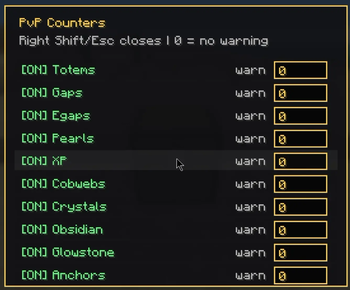
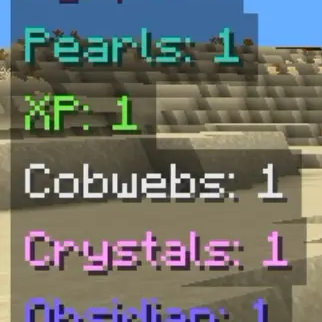
PvP Counters is a lightweight client-side Fabric mod that gives you a clean in-game HUD for tracking important PvP items while you play. It can show counters for Totems of Undying, golden apples, end crystals, respawn anchors, glowstone, obsidian, cobwebs, ender pearls, XP bottles, and other useful combat supplies, all with item-inspired colors so each counter is easy to recognize at a glance. The mod includes a simple toggle menu opened with Right Shift. From there, you can turn each counter on or off individually and set custom warning numbers for specific items. If an item reaches your warning amount or drops below it, the counter shows a red exclamation mark so you know when you are running low. If a warning is set above zero, the counter can still show at 0 with the warning mark, making it useful for checking missing supplies before or during a fight. PvP Counters is fully client-side, so it works on servers without needing to be installed server-side. It only reads your own inventory and displays helpful information on your screen. Your toggle choices and warning settings are saved locally, so the HUD stays set up the way you like between Minecraft sessions.
- Edition: Minecraft Java
- File type: .jar
- Minecraft versions listed: 1.21, 1.21.1, 1.21.2
- How to install: Install the matching mod loader (Forge, Fabric or NeoForge) for your Minecraft version. → Download the .jar. → Put it in the .minecraft/mods folder and launch that loader profile.
- Where to get it: Opens on Modrinth — not every file is mirrored on our own servers.
Install steps are the general flow for this file type — How to install Minecraft Java mods & modpacks walks through it step by step.
- Ships as pvp-counters-neoforge-universal-1.21.x-26.2-1.0.0.jar — drop this file into the mods folder
- Download size: 190 KB
- Download link checked 15 Oct 2026 — working
These come from our own check of the pack file, not from the source page.