Less particles
Bedrock add-on listed for Minecraft 1.21–26.x (resource pack only). File opened and checked on 22 Sep 2026; installs from the MC Bedrock Mods app on Android.
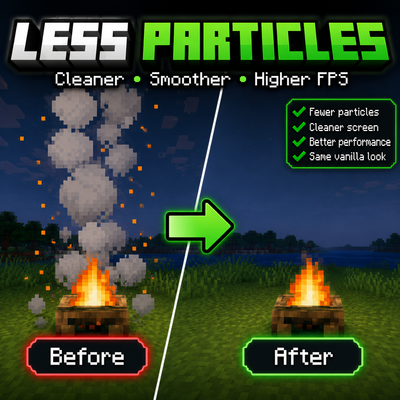
Boost your FPS and enjoy a cleaner Minecraft experience by reducing unnecessary particles. Choose from three optimization presets depending on your…
⬇ Download on CurseForgeLess particles
Less Particles is a lightweight Minecraft Bedrock resource pack that improves performance by reducing unnecessary particle effects. By displaying fewer particles, it can help increase FPS, reduce visual clutter, and provide a smoother gameplay experience without significantly changing Minecraft's vanilla appearance.
The pack includes three subpacks so you can choose the level of optimization that best suits your device:
Best for High-End Devices – Removes 45 particles while keeping most visual effects.
Best for Normal Devices (Recommended) – A balanced preset that keeps 81 important particles while removing the rest for better performance.
Best for Low-End Devices – Removes 180+ particles for the greatest FPS improvement on weaker devices.
Features
Improves FPS by reducing particle effects.
Three optimization presets for different device performance levels.
Cleaner screen with less visual clutter.
Lightweight and easy to use.
Keeps Minecraft's vanilla style as much as possible.
Works in singleplayer and multiplayer.
- Edition: Minecraft Bedrock
- File type: .mcpack or .mcaddon
- Minecraft versions listed: 1.21.122, 1.21.123, 1.21.124
- How to install: Download the .mcpack or .mcaddon file. → Open it — Minecraft imports it. → In your world: Behavior Packs → Available → Activate, then the same under Resource Packs.
- Where to get it: Opens on CurseForge — not every file is mirrored on our own servers.
Install steps are the general flow for this file type — How to install Minecraft Bedrock addons & mods walks through it step by step.
- Pack type: .mcpack — a single pack
- Manifest requires Minecraft 1.21.0 or newer
- Complete pack — everything it depends on is inside the file
- Download size: 1.7 MB
- Download link checked 15 Oct 2026 — working
These come from our own check of the pack file, not from the source page.