
Pokethelp
A client-side Fabric mod that provides an interactive interface for inserting Unicode symbols, special characters, formatting codes, and other text…
⬇ Download on Modrinth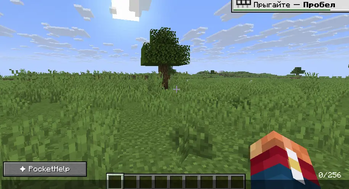
PocketHelp
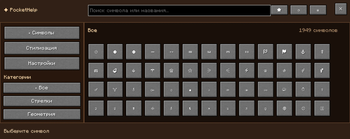
PocketHelp is a client-side Fabric mod for Minecraft that provides an interactive interface for inserting Unicode symbols, special characters, decorative characters, and text formatting codes into chat.
Features
Browse symbols by category
Search symbols by name
Insert symbols directly into the chat
Favorites
Recently used symbols
Text formatting codes
Color codes
Support for Minecraft chat formatting
Adjustable interface adapted to the game window
Client-side
PocketHelp is a client-side mod. It does not need to be installed on the server.
Installation
Install Fabric Loader for Minecraft version 1.21.11 (it is recommended to use the latest version of Fabric Loader for this release).
Download and install Fabric API for Minecraft 1.21.11:
You can download it from the official CurseForge or Modrinth websites.
The Fabric API version must match the game version 1.21.11.
Download the latest version of the PocketHelp mod (compatible with 1.21.11).
Place both the mod .jar file and the Fabric API .jar file into the mods folder of your Minecraft client.
Launch the game using the Fabric profile.
Status
PocketHelp is currently in alpha/beta development. Some features may still change or contain bugs.
- Edition: Minecraft Java
- File type: .jar
- Minecraft version listed: 1.21.11
- How to install: Install the matching mod loader (Forge, Fabric or NeoForge) for your Minecraft version. → Download the .jar. → Put it in the .minecraft/mods folder and launch that loader profile.
- Where to get it: Opens on Modrinth — not every file is mirrored on our own servers.
Install steps are the general flow for this file type — How to install Minecraft Java mods & modpacks walks through it step by step.
- Ships as pockethelp-1.0.0.jar — drop this file into the mods folder
- Download size: 94 KB
- Download link checked 6 Sept 2026 — working
These come from our own check of the pack file, not from the source page.