Chronicle: World Calendar
A fully customizable handheld calendar featuring configurable days, months, years, eras, and scheduled world events, all displayed through an immersive…
⬇ Download on Modrinth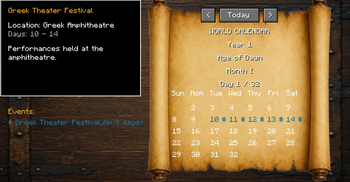
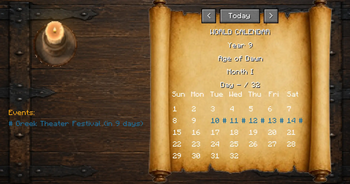
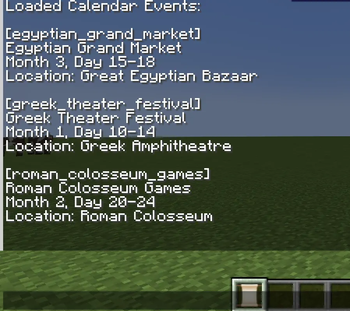
Chronicle: World Calendar
Bring your Minecraft world to life with a fully customizable calendar and event system. Chronicle: World Calendar allows you to create a living timeline for your world, complete with seasons, festivals, battles, celebrations, announcements, and story-driven events.
Designed for RPG worlds, roleplay servers, adventure maps, and custom civilizations, Chronicle gives your world a sense of history and progression.
Features
📅 Custom World Calendar
Track the passage of time with a fully customizable in-game calendar.
Features:
- Custom years
- Custom months
- Custom day lengths
- Current date tracking
- Calendar GUI
- Upcoming event display
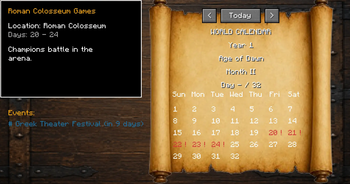
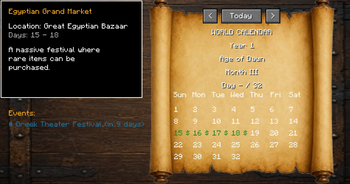
Create your own world's timeline and let history unfold naturally. Grab the calendar item from the creative menu and right click to open the calendar GUI. There you will see event details on the left and the calendar on the right. Events and Calendar layout/specs are nearly entirely configurable.
🎉 Event System
Create custom events that occur on specific dates.
Events can include:
- Custom names
- Titles and subtitles
- Descriptions
- Locations
- Colors
- Icons
- Start and end dates
- Commands
- Music
Examples:
- Royal festivals
- Arena tournaments
- Holidays
- Historical battles
- Seasonal celebrations
- Story events
- Event Announcements
Events can automatically broadcast cinematic announcements to players.
Example:
Title:
Colosseum Games
Subtitle:
Champions enter the arena!
Events can trigger:
- Titles
- Subtitles
- Server commands
- Custom effects
- Other mod integrations
- 🎵 Music Regions Integration
Chronicle integrates with Music Regions to provide dynamic event soundtracks.
Events can have custom music playlists that automatically play when the event begins.
Features:
- Custom event soundtracks
- Multiple songs per event
- Regional music override
- Automatic return to regional music after events
Example:
A Roman Colosseum event can:
- Display announcements
- Start battle music
- Override the Colosseum's normal soundtrack
- Resume normal music after the games end
Creating Events
Events are created using JSON files located in the Chronicle configuration folder.
Each event can define:
- Event ID
- Name
- Date
- Location
- Description
- Display colors
- Icons
- Commands
- Music tracks
Example event:
{
  "id": "roman_colosseum_games",
  "name": "Roman Colosseum Games",
  "month": 2,
  "startDay": 20,
  "endDay": 24,
  "musicTracks": [
    "arena_theme",
    "battle_music"
  ],
  "overrideRegionMusic": true
}
Designed For
Chronicle works especially well for:
🏰 Medieval kingdoms ⚔️ RPG adventures 🌎 Custom civilizations 📖 Story-driven worlds 🎭 Roleplay servers 🗺️ Adventure maps
Create a world where time matters and events happen naturally.
Compatibility
Optional integrations:
Music Regions 1.1.1
- Event-based music
- Dynamic soundtracks
- Regional music overrides
Chronicle does not require Music Regions to function. Events, calendars, and commands work independently.
Future Plans
- More calendar customization
- Additional event actions
- More integrations
- Expanded GUI features
- More world progression tools
Notes
Chronicle: World Calendar is designed to provide the foundation for living Minecraft worlds. Whether you are creating a fantasy empire, a historical simulation, or an adventure campaign, Chronicle allows your world to develop its own timeline and stories.
- Edition: Minecraft Java
- File type: .jar
- Minecraft version listed: 1.20.1
- How to install: Install the matching mod loader (Forge, Fabric or NeoForge) for your Minecraft version. → Download the .jar. → Put it in the .minecraft/mods folder and launch that loader profile.
- Where to get it: Opens on Modrinth — not every file is mirrored on our own servers.
Install steps are the general flow for this file type — How to install Minecraft Java mods & modpacks walks through it step by step.
- Ships as chronicle-world-calendar-1.1.0.jar — drop this file into the mods folder
- Download size: 290 KB
- Download link checked 6 Sept 2026 — working
These come from our own check of the pack file, not from the source page.