
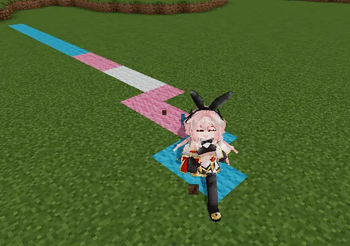
Trans Wool Trail
Walk with Pride. 🏳️⚧️
Leave a colorful trail wherever you go.
Trans Wool Trail is a lightweight cosmetic Minecraft mod that creates a temporary trail of wool in the colors of the transgender pride flag beneath your feet as you walk. The trail gradually fades away over time, leaving no permanent changes to your world.
🏳️⚧️ Features 🏳️⚧️ Creates a trail using the colors of the transgender pride flag as you walk. 🏳️⚧️ Uses the classic five-color pattern: Light Blue, Pink, White, Pink, and Light Blue. 🏳️⚧️ Trails automatically disappear after a short period of time. 🏳️⚧️ Lightweight and easy to use with no complicated setup. 🏳️⚧️ Perfect for screenshots, creative builds, multiplayer events, parkour maps, and everyday gameplay. 🏳️⚧️ How It Works
Whenever a player moves, the blocks beneath them are temporarily replaced with wool arranged in the colors of the transgender pride flag. After a configurable amount of time, the wool fades away and the original blocks are restored, ensuring your world remains unchanged.
🏳️⚧️ Great For Adding a unique visual effect to your adventures. Leaving colorful footprints during multiplayer events. Creating eye-catching screenshots and videos. Expressing support for the transgender community in a fun and creative way. 🏳️⚧️ Notes
This mod is purely cosmetic. It does not add new items, mobs, dimensions, or gameplay mechanics.
Leave your mark with pride, and let every step add a little more color to your Minecraft world. 🏳️⚧️
- Edition: Minecraft Java
- File type: .jar
- Minecraft version listed: 1.20.1
- How to install: Install the matching mod loader (Forge, Fabric or NeoForge) for your Minecraft version. → Download the .jar. → Put it in the .minecraft/mods folder and launch that loader profile.
- Where to get it: Opens on Modrinth — not every file is mirrored on our own servers.
Install steps are the general flow for this file type — How to install Minecraft Java mods & modpacks walks through it step by step.
- Ships as step_color_change_mod-1.1.0.jar — drop this file into the mods folder
- Download size: 10 KB
- Download link checked 6 Sept 2026 — working
These come from our own check of the pack file, not from the source page.