
Village Lens
Visualize a villager’s linked workstation and bed, then diagnose why it cannot claim a target block without changing villager AI.
⬇ Download on Modrinth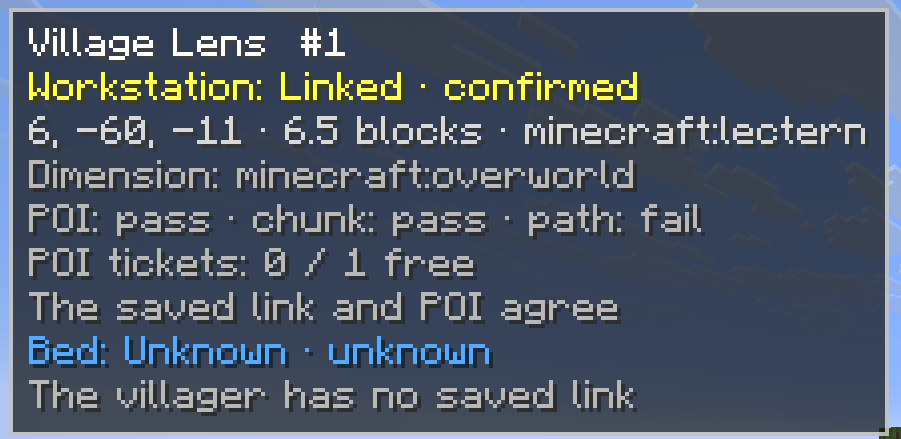
Village Lens
Village Lens shows the workstation and bed currently linked to a villager and explains why it cannot claim a selected block.
Select a villager to see its remembered workstation and bed, including their location, distance, current status, and a short diagnostic reason. You can also target a workstation or bed to check whether that villager can claim it.
Features
- Displays a villager’s linked workstation and bed
- Highlights workstations in yellow and beds in blue
- Draws lines between the villager and linked locations
- Diagnoses invalid blocks, occupied POIs, profession conflicts, unloaded chunks, range limits, and unreachable targets
- Shows diagnostic states and confidence levels
- Includes optional through-wall outlines, lines, labels, and villager highlighting
- Supports English and Japanese
Controls
- V: Select a villager or refresh its diagnosis
- Shift + V: Diagnose the targeted workstation or bed
- B: Toggle through-wall rendering
Read-only design
Village Lens does not modify villager memories, professions, POIs, paths, or AI state. It does not force-load chunks, teleport villagers, or force links between villagers and blocks.
Pathfinding checks run only when a diagnosis is requested.
Requirements
Village Lens must be installed on both the client and server.
Fabric installations also require Fabric API. Download the file matching your Minecraft version and mod loader. ~~~~
- Edition: Minecraft Java
- File type: .jar
- Minecraft version listed: 26.2
- How to install: Install the matching mod loader (Forge, Fabric or NeoForge) for your Minecraft version. → Download the .jar. → Put it in the .minecraft/mods folder and launch that loader profile.
- Where to get it: Opens on Modrinth — not every file is mirrored on our own servers.
Install steps are the general flow for this file type — How to install Minecraft Java mods & modpacks walks through it step by step.
- Ships as village-lens-0.1.0+mc26.2-neoforge.jar — drop this file into the mods folder
- Download size: 80 KB
- Download link checked 6 Sept 2026 — working
These come from our own check of the pack file, not from the source page.