
中文
是否还在因为加了太多模组,但键盘按键太少,而导致按键绑定冲突?来试试这个模组吧!
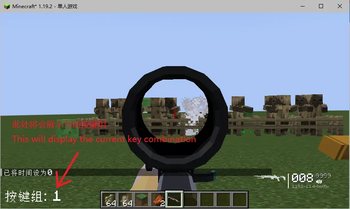
这个模组修改了按键绑定方式,添加了按键组,在修改按键的时候,同时按下数字键盘上数字和要绑定的按键,就可以将该按键绑定到对应数字键盘数字的按键组上,而在游戏中,按数字键盘上的数字按键时,可以切换到对应的按键组。每个按键组设置的按键都是独立的,所以即使在不同按键组设置相同的按键绑定,也 不会发生按键绑定冲突。值得一提的是,方向键、跳跃键、下蹲键、快捷栏的按键是不可分组的,所以你在哪个按键组都可以触发它们,而不会因为反复更换按键组来触发它们而像路易十六那样摸不着头脑。
如果有bug或好的想法,请到bilibili(DuckBoos)或抖音(2502lishehai)联系我
English
Are you still struggling with key binding conflicts because you've added too many mods but don't have enough keys on your keyboard? Give this mod a try!
It overhauls the key binding system by introducing key groups. When assigning a key, simply press a number on the numpad simultaneously with the key you want to bind, and that key will be assigned to the key group corresponding to that numpad number. In-game, pressing a numpad number switches to the corresponding key group. Each key group has its own independent key bindings, so even if you set the same key binding in different groups, there will be no conflicts. Notably, movement keys, jump, sneak, and the hotbar keys cannot be grouped, so they will always work regardless of which key group you're in.
If there are any bugs or good ideas, please reach out to me on bilibili(DuckBoos)or TikTok(China,2502lishehai)
Quick facts
- Edition: Minecraft Java
- File type: .jar
- Minecraft version listed: 1.19.2
- How to install: Install the matching mod loader (Forge, Fabric or NeoForge) for your Minecraft version. → Download the .jar. → Put it in the .minecraft/mods folder and launch that loader profile.
- Where to get it: Opens on Modrinth — not every file is mirrored on our own servers.
Install steps are the general flow for this file type — How to install Minecraft Java mods & modpacks walks through it step by step.
Verified by MCModsHub
- Ships as better_keybinds-1.0.0-beta.jar — drop this file into the mods folder
- Download size: 21 KB
- Download link checked 6 Sept 2026 — working
These come from our own check of the pack file, not from the source page.