
Falcon's ArmorStats HUD
ArmorStats HUD is a sleek, lightweight, and fully client-side quality-of-life mod that displays the real-time durability of your armor and tools directly on your screen.
Designed specifically for PvP, competitive, and survival players who need instant, clean visual feedback on their gear before it's too late.
✨ Features
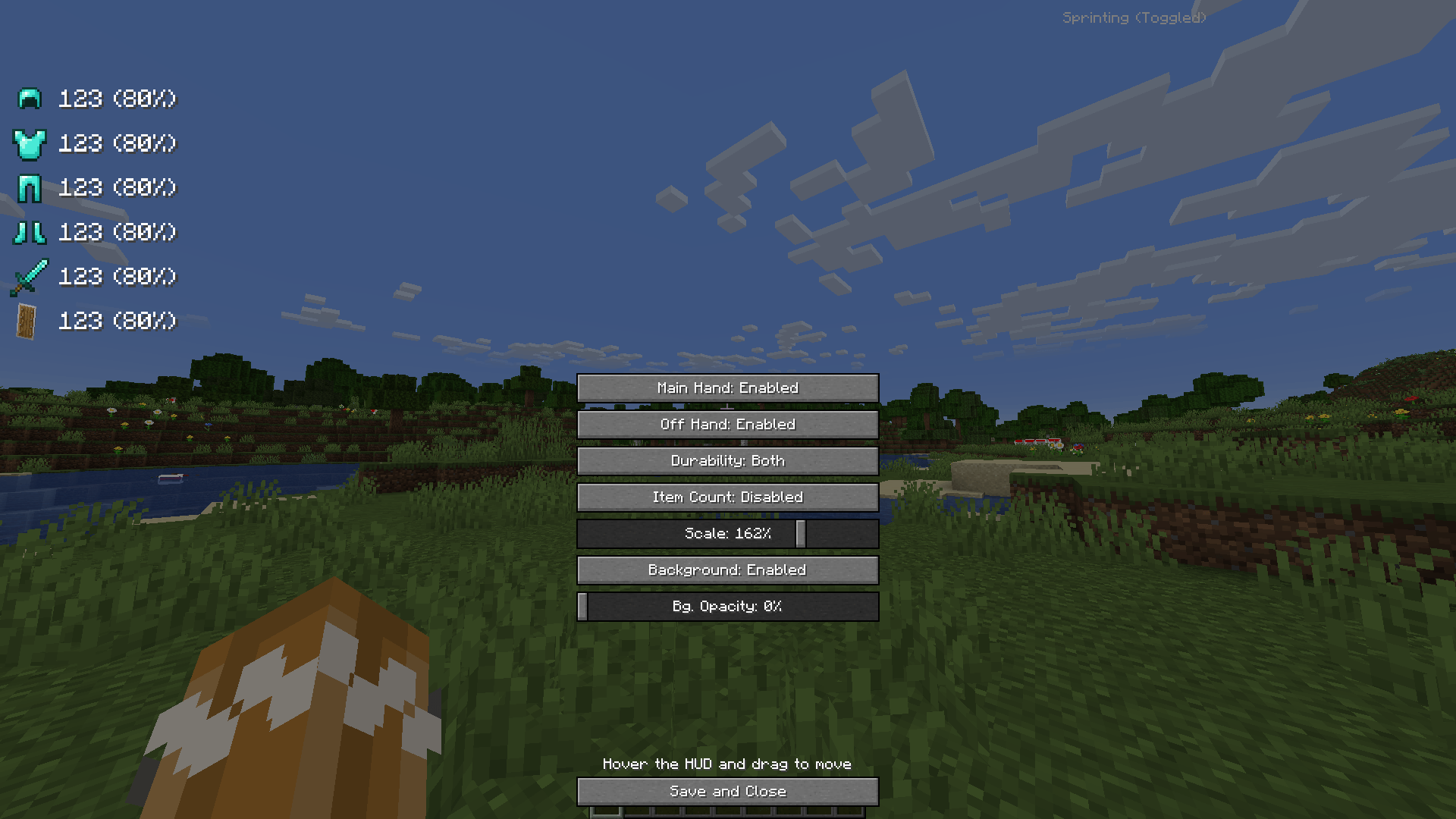
- Comprehensive Tracking: Displays the exact durability of your helmet, chestplate, leggings, boots, main-hand weapon (sword, axe), and off-hand shield.
- Custom Display Modes: Choose how you want to see your durability: percentage (%), absolute values (numerical), or both at the same time.
- Intuitive Configuration: Customize the position, scale, opacity, and background with a smooth, interactive drag-and-drop UI editor.
- 100% Client-Side: Safe to use on any multiplayer server! Zero server-side footprint.
🕹️ Usage & Configuration
Once installed, you can easily access the customization menu to drag, drop, and scale your HUD elements exactly where you want them. Fits perfectly with any vanilla or custom HUD layout!
📦 Installation & Compatibility
- Mod Loader: Built for Fabric.
- Environment: Client-side only. You do not need to install this on servers!
- Modpacks: You are completely free to include this mod in any of your modpacks!
🌐 Idiomas / Languages
- 🇺🇸 English (Native support)
- 🇪🇸 Español (Soporte completo integrado)
Quick facts
- Edition: Minecraft Java
- File type: .jar
- Minecraft version listed: 1.20.2
- How to install: Install the matching mod loader (Forge, Fabric or NeoForge) for your Minecraft version. → Download the .jar. → Put it in the .minecraft/mods folder and launch that loader profile.
- Where to get it: Opens on Modrinth — not every file is mirrored on our own servers.
Install steps are the general flow for this file type — How to install Minecraft Java mods & modpacks walks through it step by step.
Verified by MCModsHub
- Ships as ArmorStats HUD-1.0.0 (5).jar — drop this file into the mods folder
- Download size: 37 KB
- Download link checked 26 Sept 2026 — working
These come from our own check of the pack file, not from the source page.