
Amoug Us Player Model


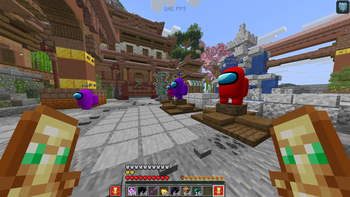
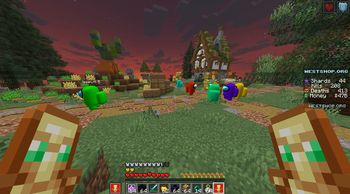
Amoug Us Player Model is a client-side mod that turns player models into colorful Among Us-style beans.
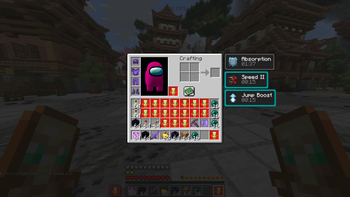
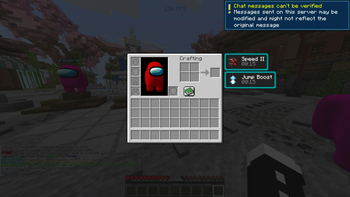
Customize your own bean color, replace your player or other players, hide armor and capes, and view your bean model in the inventory while it follows the mouse like the normal player preview.
The mod is optimized with block occlusion, distance-based model quality, and reduced rendering detail for players farther away.
Requires: Fabric API
Recommended: Mod Menu
Settings / Features List| Section | Settings | What it does |
|---|---|---|
| Player Replacement | Enable Mod, Replace My Player, Replace Other Players | Controls whether your own model and other players are replaced with the Among Us-style bean model. |
| Armor and Capes | Show Armor | Lets you toggle armor rendering on the bean model. Player capes are hidden while using the replacement model. |
| Personal Color | My Color Hue, Color Preview | Changes the color of the red portion of your bean while leaving the white visor and blue details unchanged. |
| Random Player Colors | Randomize Player Colors | Assigns different random colors to other players. Turning the option off and back on rerolls the colors. |
| Inventory Preview | Mouse-following player preview | Displays the bean model in the inventory player preview and makes it look toward the mouse. |
| Performance | Occlusion Culling, Distance Quality | Players fully hidden behind blocks are skipped, while distant players use lower rendering detail to improve performance. |
| Death Sound | Death Sound, Test Death Sound | Plays a custom sound when players die, with quieter volume for players farther away. |
| Model Controls | Scale and transform controls | Includes additional model positioning and rotation controls that remain available internally for advanced configuration. |
Become bean.


Quick facts
- Edition: Minecraft Java
- File type: .jar
- Minecraft version listed: 1.21.11
- How to install: Install the matching mod loader (Forge, Fabric or NeoForge) for your Minecraft version. → Download the .jar. → Put it in the .minecraft/mods folder and launch that loader profile.
- Where to get it: Opens on Modrinth — not every file is mirrored on our own servers.
Install steps are the general flow for this file type — How to install Minecraft Java mods & modpacks walks through it step by step.
Verified by MCModsHub
- Ships as Amoug-Us-PlayerModel-1.0.0.jar — drop this file into the mods folder
- Download size: 1.6 MB
- Download link checked 6 Sept 2026 — working
These come from our own check of the pack file, not from the source page.