
Inventory Crafting Stick (Standalone) | 便携工作台
Java mod listed for Minecraft 1.21. Downloads from the MC Java Mods app on Android.
⬇ Download on Modrinth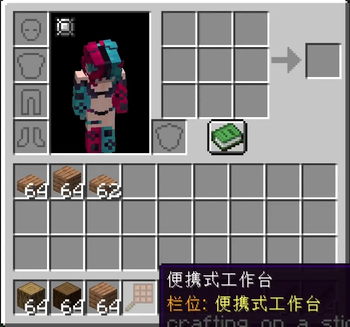
Inventory Crafting Stick (Standalone)
Portable 3x3 crafting + Curios inventory grid. NeoForge 1.21.1.
Features
- Right-click portable 3x3 crafting
- Inventory crafting grid (Curios slot)
- syncfix16 + creativefix1
How to Use | 使用方法
1. Craft the item Crafting Table + Stick = Crafting Table on a Stick
2. Right-click to craft Hold the item and right-click to open a portable 3x3 crafting grid. 手持便携式工作台右键,打开3x3合成界面。
3. Equip in Curios slot Place the item in the Curios crafting_on_a_stick slot. Open your inventory to see the 3x3 crafting grid on the left. 将物品放入Curios的便携式工作台槽位,打开背包即可看到左侧3x3合成格。
4. Both! Right-click for portable crafting AND have the inventory grid active at the same time. 右键便携合成 + 背包合成格可同时使用!
Dependencies
NeoForge 21.1.229+ / FLib 0.2.0+ / Curios 9.5.1+
Compatibility Patch | 兼容补丁
If you already have Crafting on a Stick installed, download the compat JAR from GitHub: https://github.com/yiyetang555/inventory-crafting-stick-standalone/releases
Inspired by Crafting on a Stick (OfekN) + Inventory Crafting Grid (Lothrazar) | AI-Assembled
- Edition: Minecraft Java
- File type: .jar
- Minecraft version listed: 1.21.1
- How to install: Install the matching mod loader (Forge, Fabric or NeoForge) for your Minecraft version. → Download the .jar. → Put it in the .minecraft/mods folder and launch that loader profile.
- Where to get it: Opens on Modrinth — not every file is mirrored on our own servers.
Install steps are the general flow for this file type — How to install Minecraft Java mods & modpacks walks through it step by step.
- Ships as invcrafting-stick-1.21.1.jar — drop this file into the mods folder
- Download size: 48 KB
- Download link checked 6 Nov 2026 — working
These come from our own check of the pack file, not from the source page.