Clean Fog
Tired of Minecraft’s dense, vision-limiting fog? With Clean Fog, you can see the horizon crystal clear in both the Overworld and the treacherous…
I don't know my version or loader

🌫️ Clean Fog Resource Pack
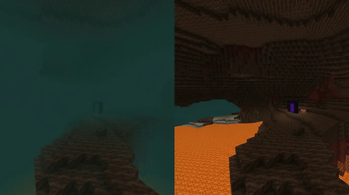
Tired of Minecraft’s dense, vision-limiting fog? With Clean Fog, you can see the horizon crystal clear in both the Overworld and the treacherous atmosphere of the Nether!
Maximize your view distance, discover structures from afar, and spot dangers early! 🚀
✨ Key Features 🌎 Overworld Clarity: Removes the gloomy fog blocking your view, giving you a much fresher and clearer landscape.
🔥 Full Nether Support: Clears the intense, eye-straining red fog in the Nether. Easily scan the distance while searching for Nether Fortresses or Bastions!
⚡ FPS Friendly & Lightweight: Put zero strain on game performance, offering a completely smooth experience.
🎮 Vanilla Compatible: Optimizes the fog atmosphere without changing any of the game's original textures.
- Edition: Minecraft Java
- File type: .zip (resource pack)
- Minecraft versions listed: 26.1, 26.1.1, 26.1.2
- How to install: Download the .zip resource pack — do not unzip it. → Put it in .minecraft/resourcepacks. → Enable it in Options → Resource Packs.
- Where to get it: Opens on Modrinth — not every file is mirrored on our own servers.
Install steps are the general flow for this file type — How to install Minecraft Java resource packs walks through it step by step.
- Downloads as Clean-Fog-26.1-26.2.zip
- Download size: 2 KB
- Download link checked 6 Sept 2026 — working
These come from our own check of the pack file, not from the source page.