Player Attack Highlight
Java mod listed for Minecraft 1.21. Downloads from the MC Java Mods app on Android.
Helpful color guide for those trying to perfect their 1.21.11+ sword skills (sword cooldown); no current plans of updating it as i stick to 1.21.11 for…
⬇ Download on Modrinth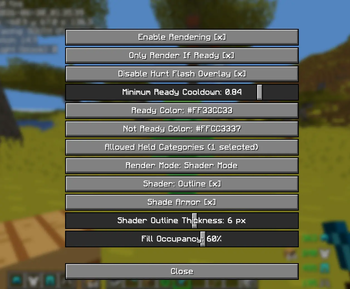
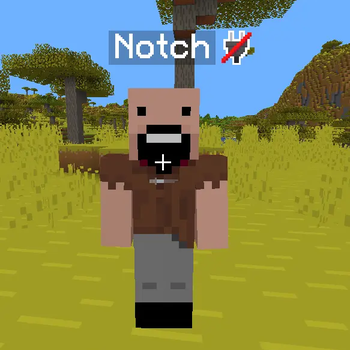
Overlay of your color choice (and opacity) is shaded over the target entity when your sword cooldown is ready to attack! Built in colour picker! Perfect their 1.21.11+ sword skills.
no current plans of updating it as i stick to 1.21.11 for now, later on or if requested, I may update it. Dont have the source code on this PC; will add later.
- Edition: Minecraft Java
- File type: .jar
- Minecraft version listed: 1.21.11
- How to install: Install the matching mod loader (Forge, Fabric or NeoForge) for your Minecraft version. → Download the .jar. → Put it in the .minecraft/mods folder and launch that loader profile.
- Where to get it: Opens on Modrinth — not every file is mirrored on our own servers.
Install steps are the general flow for this file type — How to install Minecraft Java mods & modpacks walks through it step by step.
- Ships as player-attack-highlight-1.0.0.jar — drop this file into the mods folder
- Download size: 84 KB
- Download link checked 18 Oct 2026 — working
These come from our own check of the pack file, not from the source page.