
伴途 / Companion Locator
在经验条上直观显示队友的方向、距离、头像与高度提示,并提供可配置的轮廓发光、跨维度徽记和隐私控制.Keep your party together with teammate direction, distance, head icons, and elevation cues displayed…
⬇ Download on Modrinth
伴途 / Companion Locator
一起出发,不再走散 / Adventure Together, Stay Together
中文
伴途是一款为多人游戏设计的轻量队友定位模组。它将队友头像自然地融入原版经验条:头像会根据相对方位左右移动,并随距离增加逐渐缩小,最终变成容易辨认的彩色像素标记。高度箭头、视野边缘转向提示与跨维度徽记帮助你快速理解队友所在位置,同时尽量保持原版 HUD 的视觉风格。
English
Companion Locator is a lightweight teammate locator for Minecraft: Java Edition multiplayer. It blends player heads into the vanilla experience bar: icons move left and right based on relative direction, shrink as teammates get farther away, and eventually become compact colored pixel markers. Elevation arrows, edge-of-view direction cues, and cross-dimension badges help you understand where your friends are while preserving the look and feel of the vanilla HUD.
主要功能 / Key Features
经验条定位 / Experience-bar locator
中文:在经验条上显示队友头像、方向、距离档位与高度箭头,不遮挡生命值、饱食度或经验等级数字。
English: Shows teammate heads, direction, distance tiers, and elevation arrows on the experience bar without covering health, hunger, or the experience level number.平滑且易读 / Smooth and readable
中文:服务端以 10 Hz 更新移动快照,客户端逐帧插值方向与透明度;视野边缘使用柔和渐变,减少头像移动和显隐时的跳变。
English: Moving snapshots update at 10 Hz while the client interpolates direction and opacity every frame, with smooth edge-of-view transitions to reduce visible snapping.智能多人布局 / Smart group layout
中文:2–3 位队友自动展开;人数更多时优先保留最近的三位玩家,并使用+N显示其余人数,所有标记都限制在定位条范围内。
English: Two or three teammates spread out automatically. In larger groups, the three nearest players remain visible and the rest are summarized as+N, with every marker kept inside the locator bar.距离缩放与独立颜色 / Distance scaling and distinct colors
中文:近处显示完整头像,距离增加时逐级缩小并转为像素色块;不同玩家使用稳定的标记颜色,便于快速区分。
English: Nearby teammates use full head icons, while distant teammates shrink into compact pixel markers. Stable per-player marker colors make party members easier to distinguish at a glance.跨维度提示 / Cross-dimension indicators
中文:不同维度的队友不会显示容易误解的方向,而是在定位条边缘显示主世界、下界、末地或其他维度的像素徽记与人数。
English: Teammates in another dimension do not show misleading directions. Instead, pixel badges at the edge of the bar indicate the Overworld, Nether, End, or another dimension together with a player count.多种显示模式 / Multiple display modes
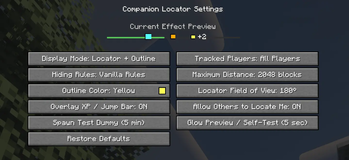
中文:可选择仅显示定位条、仅使用持续轮廓发光、同时启用两者,或完全关闭;轮廓发光支持自选颜色。
English: Choose the locator bar, persistent entity outlines, both at once, or disable the feature entirely. Outline colors are configurable.发光预览与自检 / Outline preview and diagnostics
中文:设置界面提供发光预览与自检。如果光影或渲染模组关闭了原版实体轮廓管线,界面会给出风险提示,而定位条仍可继续工作。
English: The settings screen includes an outline preview and diagnostic check. If a shader or rendering mod disables the vanilla entity-outline pipeline, the screen reports the risk while the locator bar remains available.服务器统一配置 / Server-authoritative configuration
中文:房主或服务器管理员调整全局规则后会自动同步给所有玩家,普通玩家只能查看全局设置。
English: Global rules are controlled by the host or server administrators and automatically synchronized to every player. Regular players can view, but not alter, those rules.玩家隐私控制 / Player privacy controls
中文:每位玩家都可以单独决定是否允许其他玩家定位自己,个人选择会在世界中持久保存。
English: Every player can decide whether others are allowed to locate them, and that personal choice is persisted per world.测试模式 / Test mode
中文:房主或管理员可在当前位置生成一个五分钟后自动销毁的测试假人,用于检查定位、缩放、方位和发光效果;每位管理员同时只保留一个测试假人。
English: Hosts and administrators can spawn a test dummy at their current position. It automatically disappears after five minutes and can be used to verify positioning, scaling, direction, and outline effects. Each administrator can have only one active dummy at a time.特殊 HUD 适配 / Special HUD handling
中文:骑乘跳跃条出现时会自动避让,并适配创造模式、旁观模式、隐藏 HUD、不同 GUI 缩放与较小分辨率。
English: The locator automatically avoids the mount jump bar and adapts to Creative Mode, Spectator Mode, hidden HUDs, different GUI scales, and smaller resolutions.中英双语 / Chinese and English
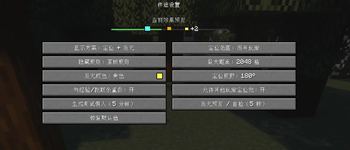
中文:设置、提示、诊断和错误信息提供简体中文与英文,并跟随每位玩家自己的游戏语言。
English: Settings, prompts, diagnostics, and error messages are available in Simplified Chinese and English and follow each player's game language.
支持版本 / Supported Versions
每个 Minecraft 版本与加载器都有独立的精确版本 JAR。
Each Minecraft version and mod loader has its own exact-version JAR.
| Minecraft / 我的世界 | Fabric | Forge | Java |
|---|---|---|---|
| 1.19.2 | ✓ | ✓ | 17 |
| 1.19.4 | ✓ | ✓ | 17 |
| 1.20.1 | ✓ | ✓ | 17 |
| 1.20.2 | ✓ | ✓ | 17 |
| 1.20.4 | ✓ | ✓ | 17 |
| 1.20.6 | ✓ | ✓ | 21 |
| 1.21.1 | ✓ | ✓ | 21 |
| 1.21.3 | ✓ | ✓ | 21 |
| 1.21.4 | ✓ | ✓ | 21 |
| 1.21.5 | ✓ | ✓ | 21 |
中文: Minecraft Java Edition 1.21.6 已加入原生定位条,因此本模组的兼容上限有意停在 1.21.5。未列出的过渡补丁版本没有宣称二进制兼容,请严格按照下载文件标注的 Minecraft 版本与加载器进行选择。
English: Minecraft: Java Edition 1.21.6 introduced the vanilla Locator Bar, so this mod intentionally stops at 1.21.5. Unlisted interim patch versions are not claimed to be binary compatible; always select the file matching your exact Minecraft version and loader.
安装要求 / Installation Requirements
中文
- 下载与你的 Minecraft 版本和加载器完全对应的 JAR。
- 将 JAR 放入客户端的
mods文件夹。 - 多人游戏时,服务器也必须安装相同 Minecraft 版本、相同加载器和相同模组版本的 JAR。
- Fabric 版本还需要安装对应 Minecraft 版本的 Fabric API;Forge 版本没有额外的必需模组依赖。
- 进入世界后按
H打开设置。按键可在原版控制设置中修改。
不要同时安装 Fabric 与 Forge 包,也不要将源码包或开发包放进 mods 文件夹。正式版不能与旧 Alpha/Beta 版本混合联机。
English
- Download the JAR matching your exact Minecraft version and mod loader.
- Place the JAR in the client's
modsfolder. - For multiplayer, the server must also install the JAR matching the same Minecraft version, loader, and mod version.
- Fabric builds additionally require the matching version of Fabric API. Forge builds have no additional required mod dependency.
- Press
Hafter joining a world to open the settings screen. The key can be changed in Minecraft's Controls menu.
Do not install the Fabric and Forge builds together, and do not place source or development JARs in the mods folder. The release version cannot connect to old Alpha or Beta builds.
配置与权限 / Configuration and Permissions
中文
- 房主、单人世界所有者或拥有服务器管理权限的玩家可以修改全局显示模式、定位范围、轮廓发光颜色等设置。
- 全局设置由服务器保存并自动同步,客户端不能绕过权限直接修改。
- 普通玩家可以自由调整自己的“允许其他玩家定位我”选项。
- 测试假人与服务器级测试功能仅限房主或管理员使用。
English
- The host, single-player world owner, or players with server administration permission can change global display modes, locator range, outline color, and related settings.
- Global settings are saved by the server and synchronized automatically; clients cannot bypass permission checks.
- Regular players remain free to change their own “Allow other players to locate me” option.
- Test dummies and server-level test tools are restricted to hosts and administrators.
兼容性提示 / Compatibility Notes
中文
- HUD 使用 Fabric/Forge 提供的叠加层,不修改经验值、计分板队伍或服务端玩家实体。
- 已针对原版经验条、经验等级数字、骑乘跳跃条、创造/旁观模式和多种 GUI 缩放进行处理。
- 光影或渲染模组可能关闭原版实体轮廓管线,导致轮廓发光不可见;这不会影响经验条定位功能,可通过设置页的发光自检查看诊断。
- 与大型整合包、HUD 重制或渲染组合共同使用时,建议先在目标 Minecraft 版本中进行一次启动与联机测试。
English
- The HUD uses overlays supplied by Fabric or Forge and does not modify experience values, scoreboard teams, or server-side player entities.
- Vanilla experience bars, level numbers, mount jump bars, Creative/Spectator modes, and multiple GUI scales are handled explicitly.
- Shaders or rendering mods may disable the vanilla entity-outline pipeline and make glowing outlines invisible. This does not affect experience-bar locating; use the outline diagnostic in settings for more information.
- When using large modpacks, HUD overhauls, or complex rendering combinations, perform a quick launch and multiplayer test on the target Minecraft version.
- Edition: Minecraft Java
- File type: .jar
- Minecraft version listed: 1.21.5
- How to install: Install the matching mod loader (Forge, Fabric or NeoForge) for your Minecraft version. → Download the .jar. → Put it in the .minecraft/mods folder and launch that loader profile.
- Where to get it: Opens on Modrinth — not every file is mirrored on our own servers.
Install steps are the general flow for this file type — How to install Minecraft Java mods & modpacks walks through it step by step.
- Ships as companion_locator-forge-1.21.5-1.0.0.jar — drop this file into the mods folder
- Download size: 279 KB
- Download link checked 7 Sept 2026 — working
These come from our own check of the pack file, not from the source page.