
Better Blur+
Java mod listed for Minecraft 26.x. Downloads from the MC Java Mods app on Android.
Adds real vanilla-shader blur behind inventory, furnaces, smokers, other containers, chat, and the pause menu. Configurable radius, fade animation…
⬇ Download on Modrinth
🌫️ Better Blur+
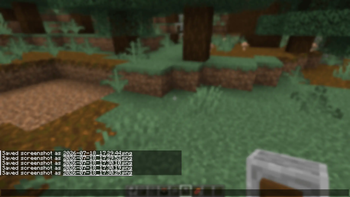
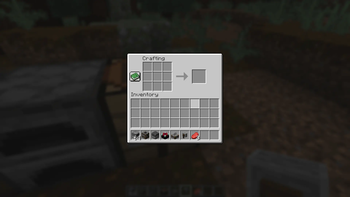
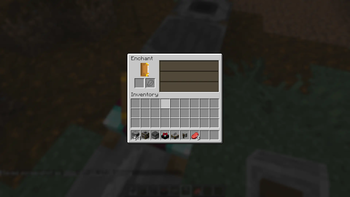
Better Blur adds a real, shader-based blur behind your inventory, furnace, smoker, other container screens, chat, and the pause menu using Minecraft's own vanilla blur engine, not a custom re-implementation.
Unlike overlay-based "fake blur" mods, Better Blur+ reuses vanilla's native post-process blur shader, so it renders with the same quality and performance characteristics as Minecraft's built-in menu blur, while extending it to more screens with full control over where it appears.
✨ Features
- 🌫️ Native, shader-accurate blur built on Minecraft's own vanilla blur engine.
- 🎒 Blurs inventory, furnace, smoker, crafting table, anvil, and other container screens.
- ⏸️ Blurs the pause menu.
- 💬 Blurs behind chat.
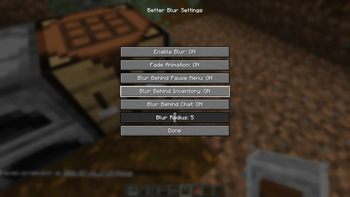
- 🎚️ Fully configurable blur radius via an in-game slider.
- 🌊 Smooth fade in/out animation when screens open and close.
- 🧩 Independent per-screen toggles for inventory, chat, and pause menu.
- 🚫 Main menu and world-loading screens are never blurred, preserving the vanilla experience.
- ⚙️ Lightweight with no custom shader pipeline or extra GPU overhead beyond vanilla's own blur.
🎮 Opening the Config Menu
Better Blur+ includes a dedicated keybind to open its settings screen at any time.
- ⌨️ Default keybind: B
- 🔁 Rebind it anytime from Options → Controls → Key Binds → Better Blur+.
- 🧰 If you have Mod Menu installed, you can also open the config from the Mods list.
✅ Why Choose Better Blur+?
Minecraft's vanilla blur is limited to the pause menu. Better Blur+ extends that same native effect to the screens you actually spend the most time in, including your inventory, furnaces, smokers, and chat, without affecting the main menu or loading screens.
Everything is adjustable, including blur radius, animation, and which screens receive the blur effect, all from one simple in-game configuration menu.
📌 Compatibility
- ✔ Minecraft Java Edition 1.21.1
- ✔ Fabric Edition
- ✔ Requires Fabric API
- ✔ Optional Mod Menu integration
- ✔ Client-side only
- 🔜 Forge, NeoForge, and Quilt editions are in development
Give your inventory, furnaces, smokers, chat, and pause menu the same polished, native blur Minecraft already uses for its pause screen with Better Blur+.
- Edition: Minecraft Java
- File type: .jar
- Minecraft version listed: 26.1
- How to install: Install the matching mod loader (Forge, Fabric or NeoForge) for your Minecraft version. → Download the .jar. → Put it in the .minecraft/mods folder and launch that loader profile.
- Where to get it: Opens on Modrinth — not every file is mirrored on our own servers.
Install steps are the general flow for this file type — How to install Minecraft Java mods & modpacks walks through it step by step.
- Ships as Better-Blur-Fabric-26.1.jar — drop this file into the mods folder
- Download size: 13 KB
- Download link checked 18 Oct 2026 — working
These come from our own check of the pack file, not from the source page.