💾VectorLock: Waypoints — Save, Track & Teleport to Any Spot🌀
📍 VectorLock: Waypoints — Save, Track & Teleport to Any Spot Never lose your base, mine, or farm again. Drop a waypoint anywhere, watch a live compass…
⬇ Download on CurseForge
📍 VectorLock: Waypoints — Save, Track & Teleport to Any Spot
Never lose your base, mine, or farm again. Drop a waypoint anywhere, watch a live compass track it on your screen, and warp back in one tap — all from a clean in-game menu, no commands needed.
VectorLock: Waypoints is a lightweight Minecraft Bedrock add-on built on the Stable Script API — no Experiments required. It keeps Achievements Enabled, and runs standalone or alongside the rest of the VectorLock suite (VectorLock Core recommended, not required).
Original work — p7x939 (VectorLock Studio)
✅ Requirements & Compatibility
- Minecraft Bedrock 1.21.70+
- Behavior Pack only — no Resource Pack needed
- No Experiments required (Stable Script API)
- Works in Singleplayer, Multiplayer, and Realms
- Achievement-safe (
product_type: addonset correctly) - Standalone-capable — VectorLock Core is optional, not required
🧭 What It Does
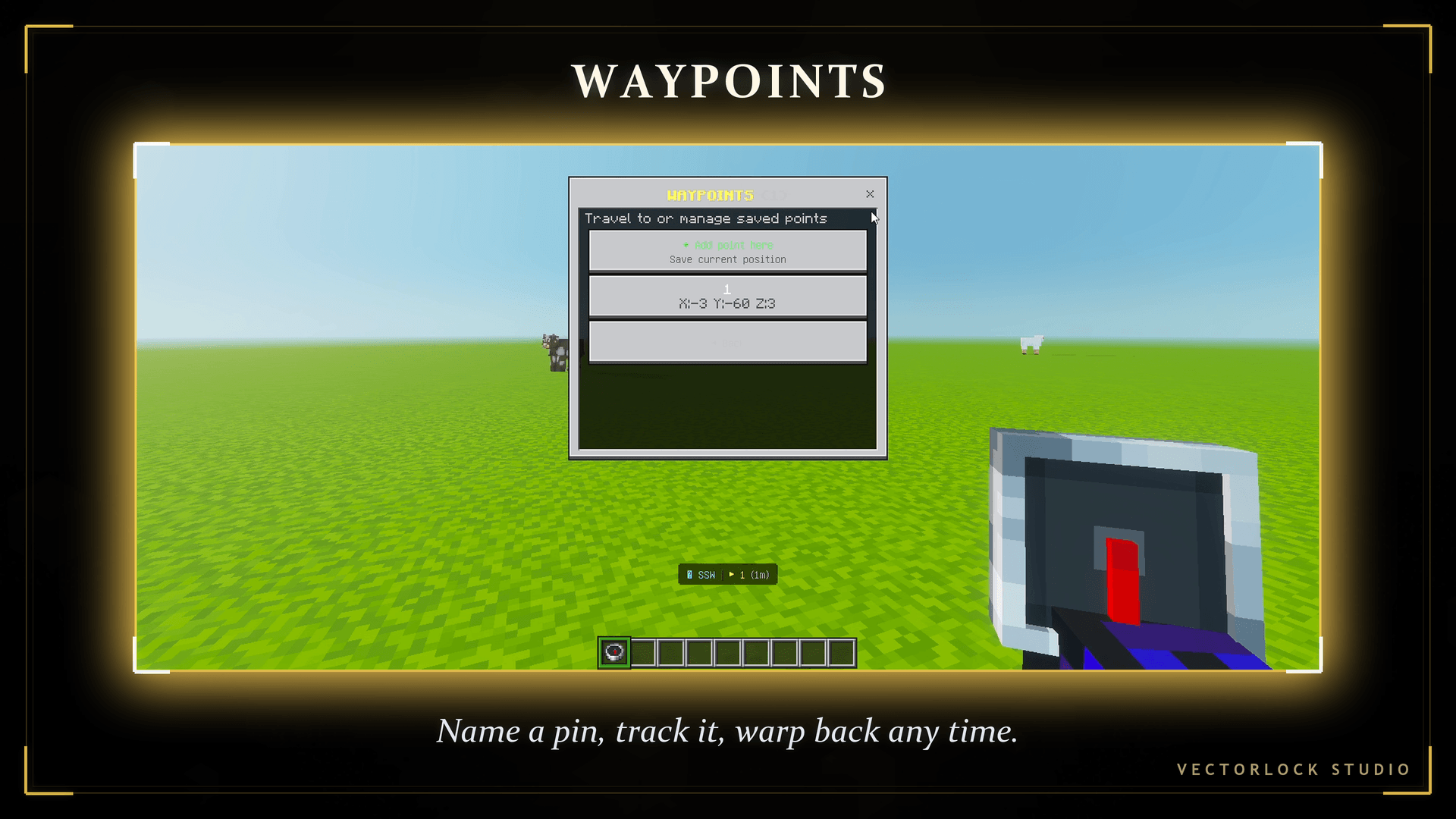
Waypoints gives you a personal set of coordinate markers you can save, name, and jump back to at any time. A small on-screen compass keeps pointing at your closest saved point so you always know which way to walk — and if you die, your last location is saved automatically so you never lose your gear's location.
✨ Features
- Save up to 20 named waypoints — stand anywhere and save your exact position with a custom name (Home, Mine, Farm, anything). When the list is full, the oldest point rolls off to make room for the new one
- One-tap teleport — open the list, pick a waypoint, and warp straight to it
- Live HUD compass — a bottom-of-screen tracker shows your current facing direction, plus a bearing arrow, name, and distance to your nearest waypoint, updating in real time
- Auto-hides for archers — the compass tracker steps aside while you're aiming a bow or crossbow so it never blocks other VectorLock HUD elements
- Automatic death waypoints — die, and your death spot is saved for you as a "☠ Death" waypoint with a timestamp, with a respawn message pointing you to it
- Per-dimension aware — waypoints remember which dimension they were saved in and teleport you there correctly
- Manage anytime — rename by re-adding, delete any waypoint you no longer need, right from the menu
🎮 How to Use
Sneak + hold a Compass to open the VectorLock menu, then select Waypoints:
- Tap Add point here to save your current spot with a name
- Tap any saved waypoint to Teleport or Delete it
- Watch the bottom of your screen for the live compass — it always points at your nearest saved waypoint with the distance in meters
📥 Installation
- Download the
.mcaddonfile - Open it (or import via Minecraft) to add it to your Behavior Packs
- Enable VectorLock: Waypoints in your world's Behavior Packs
- Join the world — Sneak + hold a Compass to open the menu
❓ FAQ
Does this require Experiments? No — it runs entirely on the Stable Script API.
Will this disable my Achievements? No — the pack is flagged correctly so Achievements stay enabled on a fresh world.
Do I need VectorLock Core? No — Waypoints works completely standalone. Core just lets it share one menu with other VectorLock add-ons if you use more than one.
Does it work on Realms and in Multiplayer? Yes, for every player individually — each player's waypoints are their own.
What happens to my waypoints if I die? Nothing is lost — your death spot is saved automatically as a new waypoint, on top of anything you've already saved.
How many waypoints can I keep? Up to 20 per player. Saving a 21st drops your oldest point, so delete the ones you no longer need to keep your list tidy.
Can other add-ons see my compass HUD? The compass tracker steps aside automatically while you're holding a bow or crossbow so it won't overlap with aiming HUDs like Bow Aiming.
🔒 More From VectorLock
| Add-on | What it does |
|---|---|
| VectorLock: Fly | Double-tap jump to toggle creative-style flight with fall damage cancelled |
| VectorLock: Item Magnet | Automatically pulls nearby dropped items and XP orbs to you |
| VectorLock: Tree Cutter | Break one log, the whole tree comes down |
| VectorLock: Vein Miner | Mine one ore, the whole connected vein comes with it |
| VectorLock: Core | Shared hub menu for running multiple VectorLock add-ons together |
⚠️ License
© 2026 p7x939. All Rights Reserved. This add-on is original work; unauthorized re-upload, redistribution, or modification is not permitted.
- Edition: Minecraft Bedrock
- File type: .mcpack or .mcaddon
- Minecraft versions listed: 1.21.81, 1.21.93, 1.21.73
- How to install: Download the .mcpack or .mcaddon file. → Open it — Minecraft imports it. → In your world: Behavior Packs → Available → Activate, then the same under Resource Packs.
- Where to get it: Opens on CurseForge — not every file is mirrored on our own servers.
Install steps are the general flow for this file type — How to install Minecraft Bedrock addons & mods walks through it step by step.
💾VectorLock: Waypoints — Save, Track & Teleport to Any Spot🌀 is a free Minecraft Bedrock addon. Compatible with Minecraft 1.21.81, 1.21.93, 1.21.73, 1.21.90 and newer. Downloaded 416 times (via CurseForge). Download it and open it directly in the game.