
✨ TextureEra
TextureEra is a clean and minimalist resource pack for Minecraft Java Edition, designed to refresh the look of vanilla items while keeping the original Minecraft style.
📦 Features
- 🎨 Redesigned item textures
- ✨ Vanilla-friendly style
- ⚔️ Perfect for Survival & PvP
- 📈 Regular updates with new textures
🖼️ Currently Included
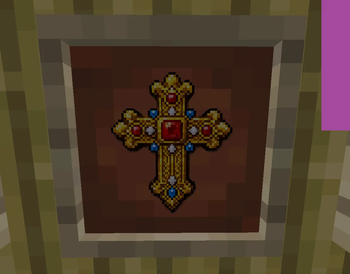
- Totem of Undying
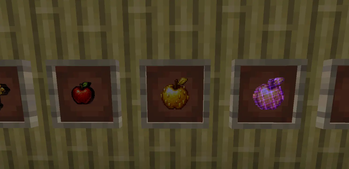
- Apple
- Golden Apple
- Enchanted Golden Apple
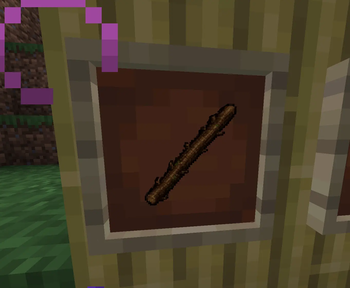
- Stick
More textures are coming in future updates!
✅ Compatibility
- Minecraft: 1.21.4+
- Edition: Java Edition
📥 Installation
- Download the latest version of TextureEra.
- Move the
.zipfile into yourresourcepacksfolder. - Launch Minecraft.
- Enable the resource pack in Options → Resource Packs.
❤️ Support
If you enjoy TextureEra, consider leaving a ⭐ on Modrinth. Every download, favorite, and follow helps the project grow!
© 2026 TextureEra — Created by H1nkal1k
Quick facts
- Edition: Minecraft Java
- File type: .zip (resource pack)
- Minecraft versions listed: 1.21.4, 1.21.5, 1.21.6
- How to install: Download the .zip resource pack — do not unzip it. → Put it in .minecraft/resourcepacks. → Enable it in Options → Resource Packs.
- Where to get it: Opens on Modrinth — not every file is mirrored on our own servers.
Install steps are the general flow for this file type — How to install Minecraft Java resource packs walks through it step by step.
Verified by MCModsHub
- Downloads as Texture_Era.zip
- Download size: 5.7 MB
- Download link checked 7 Sept 2026 — working
These come from our own check of the pack file, not from the source page.