
Showcase-Containers
Java mod listed for Minecraft 1.21–26.x. Downloads from the MC Java Mods app on Android.
⬇ Download on Modrinth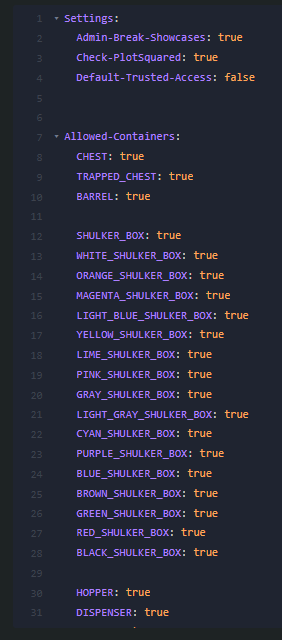
Deutsch
Showcase ist ein modernes Showcase-Plugin für Paper-Server, mit dem Spieler Kisten, Redstone-Truhen, Fässer, Shulkerboxen und weitere Container als sichere Ausstellungsstücke verwenden können.
Spieler können den Inhalt eines Showcases ansehen, ohne Items herausnehmen oder hineinlegen zu können. Der Besitzer kann sein Showcase verwalten, Admins können Showcases entfernen oder – je nach Einstellung – direkt abbauen. Das Plugin unterstützt PlotSquared, Doppelkisten, Hopper-Schutz, Hopper-Minecart-Schutz, Explosionsschutz und einen sicheren Vorschau-Modus.
Features: • Showcase-System für Container • Unterstützt Kisten, Redstone-Truhen, Fässer, Shulkerboxen, Hopper, Dispenser und Dropper • Sichere Vorschau-GUI für Besucher • PlotSquared-Unterstützung • Trusted-Zugriff pro Showcase einstellbar • Schutz vor Item-Entnahme • Schutz vor Hoppern und Hopper-Minecarts • Schutz vor Explosionen • Admins können Showcases direkt entfernen oder abbauen • Alle erlaubten Container sind in der Config einstellbar
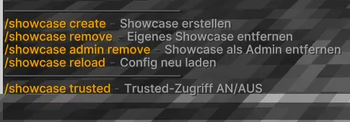
Befehle: /showcase create – Erstellt ein Showcase durch Rechtsklick auf einen Container /showcase remove – Entfernt ein eigenes Showcase /showcase trusted – Schaltet Trusted-Zugriff für ein Showcase an oder aus /showcase admin remove – Entfernt ein beliebiges Showcase als Admin /showcase reload – Lädt die Config neu
Permissions: showcase.use – Erlaubt das Erstellen von Showcases showcase.remove – Erlaubt das Entfernen eigener Showcases showcase.admin – Admin-Zugriff auf Showcases showcase.admin.remove – Erlaubt das Entfernen aller Showcases showcase.admin.break – Erlaubt Admins, Showcases direkt abzubauen showcase.reload – Erlaubt das Neuladen der Config
English
Showcase is a modern showcase plugin for Paper servers that allows players to turn chests, trapped chests, barrels, shulker boxes and other containers into secure display showcases.
Players can view the contents of a showcase without being able to take or insert items. Owners can manage their own showcases, while admins can remove showcases or directly break them depending on the configuration. The plugin supports PlotSquared, double chests, hopper protection, hopper minecart protection, explosion protection and a secure preview mode.
Features: • Showcase system for containers • Supports chests, trapped chests, barrels, shulker boxes, hoppers, dispensers and droppers • Secure preview GUI for visitors • PlotSquared support • Per-showcase trusted access toggle • Protection against item removal • Hopper and hopper minecart protection • Explosion protection • Admins can remove or directly break showcases • Allowed containers are configurable
Commands: /showcase create – Create a showcase by right-clicking a container /showcase remove – Remove your own showcase /showcase trusted – Toggle trusted access for a showcase /showcase admin remove – Remove any showcase as an admin /showcase reload – Reload the config
Permissions: showcase.use – Allows creating showcases showcase.remove – Allows removing own showcases showcase.admin – Admin access to showcases showcase.admin.remove – Allows removing all showcases showcase.admin.break – Allows admins to directly break showcases showcase.reload – Allows reloading the config
- Edition: Minecraft Java
- File type: .jar
- Minecraft versions listed: 1.21.11, 26.1, 26.1.1
- How to install: Install the matching mod loader (Forge, Fabric or NeoForge) for your Minecraft version. → Download the .jar. → Put it in the .minecraft/mods folder and launch that loader profile.
- Where to get it: Opens on Modrinth — not every file is mirrored on our own servers.
Install steps are the general flow for this file type — How to install Minecraft Java mods & modpacks walks through it step by step.
- Ships as Showcase-1.2.jar — drop this file into the mods folder
- Download size: 52 KB
- Download link checked 28 Sept 2026 — working
These come from our own check of the pack file, not from the source page.