
Purpurbars
Java mod listed for Minecraft 1.8–26.x. Downloads from the MC Java Mods app on Android.
basicly its an really really s1mple plugin its jst adds purpurbars to folia/papermc/bukkit and then there is an reinbow mode too !
⬇ Download on Modrinth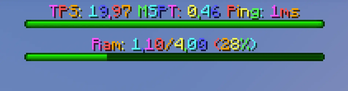
PurpurBars
Staff performance bossbars for Bukkit, Spigot, Paper, Purpur, and Folia — one jar, Minecraft 1.8 all the way to the latest release.
Commands
/tpsbar — live TPS / MSPT / Ping bossbar with automatic green/yellow/red color coding
/tpsbar color <color>— force a fixed bar color, orAUTOfor usage-based coloring/tpsbar alertsound— toggle your personal low-TPS alert sound
/ram — fully customizable RAM usage bar
toggle— turn it on/offram— print current RAM usage straight to chat, no bar neededcolor— force a fixed color or auto-color based on usagestyle— change the bossbar segment styleformat— custom text using{used}{max}{percent}placeholdersthreshold— set your own warning/critical percentagesreset— restore all defaults
/barsgui — in-game menu with two toggles: rainbow mode (animated color cycling across both bars) and the low-TPS alert sound
Low-TPS Alert Sound
Configurable in config.yml — set your own threshold, sound, and cooldown. Every player with it enabled hears an alert the moment server TPS drops below your threshold.
Access Control
Works out of the box with LuckPerms or any other permissions plugin via the standard purpurbars.use node — grant it to whichever group you want. Server operators always have access automatically, no extra setup needed.
Persistence
Every setting — bar on/off, colors, styles, custom formats, thresholds, rainbow mode, alert sound preference — saves per-player and survives rejoins and restarts, with stable bar ordering (TPS and RAM won't swap positions between sessions).
Cross-Version, Cross-Platform, One Jar
Automatically detects Folia (uses the threaded region scheduler) vs. plain Bukkit/Spigot/Paper (classic scheduler). Uses a real bossbar on 1.9+, and automatically falls back to an action-bar display on 1.8, where bossbars don't exist in the game at all.
Optional PlaceholderAPI Support
If installed, automatically registers:
%purpurbars_tps%%purpurbars_mspt%%purpurbars_ping%%purpurbars_ram_used%%purpurbars_ram_max%%purpurbars_ram_percent%
No PlaceholderAPI? No problem — everything else works identically.
- Edition: Minecraft Java
- File type: .jar
- Minecraft versions listed: 1.8, 1.8.1, 1.8.2
- How to install: Install the matching mod loader (Forge, Fabric or NeoForge) for your Minecraft version. → Download the .jar. → Put it in the .minecraft/mods folder and launch that loader profile.
- Where to get it: Opens on Modrinth — not every file is mirrored on our own servers.
Install steps are the general flow for this file type — How to install Minecraft Java mods & modpacks walks through it step by step.
- Ships as PurpurBars.jar — drop this file into the mods folder
- Download size: 24 KB
- Download link checked 28 Sept 2026 — working
These come from our own check of the pack file, not from the source page.