
Goodbye Grass
Java mod listed for Minecraft 1.20. Downloads from the MC Java Mods app on Android.
⬇ Download on Modrinth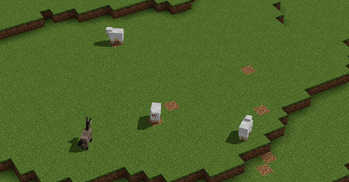
Goodbye Grass
🏳️⚧️ A cleaner world starts from the very first block.**
Goodbye Grass is a lightweight world generation mod that prevents grass, flowers, bushes, and mushrooms from naturally generating in newly created chunks, giving your Minecraft world a cleaner and more open look.
🏳️⚧️ Features
🏳️⚧️ Prevents Short Grass and Tall Grass from generating. 🏳️⚧️ Prevents all naturally generated Flowers. 🏳️⚧️ Prevents naturally generated Bushes. 🏳️⚧️ Prevents naturally generated Mushrooms. 🏳️⚧️ Lightweight and performance-friendly. 🏳️⚧️ Only affects newly generated chunks.
🏳️⚧️ How It Works
Whenever Minecraft generates a new chunk, Goodbye Grass removes decorative vegetation from world generation. Biomes still generate normally, but without naturally placed grass, flowers, bushes, or mushrooms, resulting in a much cleaner landscape.
🏳️⚧️ Perfect For
🏳️⚧️ Builders who want to spend less time clearing vegetation. 🏳️⚧️ Survival players who prefer better visibility. 🏳️⚧️ Map makers looking for clean terrain. 🏳️⚧️ Modpack creators who want a minimalist world generation style.
🏳️⚧️ Notes
🏳️⚧️ Only affects world generation. 🏳️⚧️ Existing plants in previously generated chunks are not removed. 🏳️⚧️ Does not add any new blocks, items, or gameplay mechanics. 🏳️⚧️ Designed to be lightweight and compatible with most modpacks.
🏳️⚧️ Say goodbye to unnecessary vegetation and enjoy a cleaner Minecraft world from the very beginning.**
- Edition: Minecraft Java
- File type: .jar
- Minecraft version listed: 1.20.1
- How to install: Install the matching mod loader (Forge, Fabric or NeoForge) for your Minecraft version. → Download the .jar. → Put it in the .minecraft/mods folder and launch that loader profile.
- Where to get it: Opens on Modrinth — not every file is mirrored on our own servers.
Install steps are the general flow for this file type — How to install Minecraft Java mods & modpacks walks through it step by step.
- Ships as no_grass_flowers_mod-1.0.0.jar — drop this file into the mods folder
- Download size: 6 KB
- Download link checked 19 Oct 2026 — working
These come from our own check of the pack file, not from the source page.