
BackToBeta
Turn modern Minecraft 1.20.4 into a nostalgic Beta-inspired experience with a redesigned HUD, classic menus, custom loading screens and Beta-style…
⬇ Download on Modrinth
| Resource Pack | Fabric API |
|---|---|
 |
|
BackToBeta
What if Minecraft Beta never ended?
BackToBeta transforms Minecraft 1.20.4 into a modern Beta experience while preserving the stability and performance of today's versions.
The goal of this mod is not simply recreating Minecraft Beta. Instead, it imagines an alternate timeline where Minecraft continued to evolve without losing its iconic Beta identity.
[!IMPORTANT] Requires BackToBeta - Resource Pack to work properly.
This resource pack is mandatory for the complete BackToBeta experience and includes the textures, UI elements and visual changes used by the mod.
Features
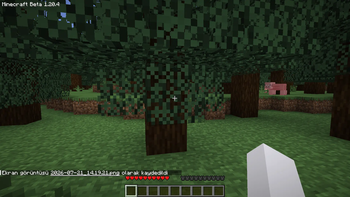
- Completely redesigned Beta-style HUD
- Custom Mojang loading screen
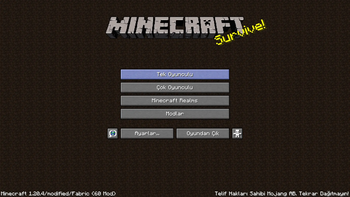
- Beta-inspired main menu
- Classic survival atmosphere
- Hunger-free gameplay
- Modern mechanics removed or redesigned
- Nostalgic visuals and UI improvements
- Fabric support for Minecraft 1.20.4
- Improved immersion and compatibility
Gameplay Changes
BackToBeta removes or redesigns many modern mechanics to create a true Beta-style experience.
Some examples include:
- No Hunger Bar
- Beta-style Health System
- Beta-inspired Armor HUD
- Classic Menu Design
- Custom Loading Screens
- Classic Survival Feel
- Modern Minecraft aesthetics replaced with nostalgic alternatives
Designed For
BackToBeta is perfect for players who:
- Miss Minecraft Beta.
- Want a modern Beta experience.
- Love nostalgic Minecraft gameplay.
- Prefer simpler survival mechanics.
- Enjoy classic Minecraft aesthetics.
Requirements
- Minecraft 1.20.4
- Fabric Loader
- BackToBeta - Resource Pack (Required)
Developer
Developer: KeroDev
Minecraft Version
- Minecraft 1.20.4
- Fabric Loader
Welcome back to Beta.
- Edition: Minecraft Java
- File type: .jar
- Minecraft versions listed: 1.20.4, 1.20.5, 1.20.6
- How to install: Install the matching mod loader (Forge, Fabric or NeoForge) for your Minecraft version. → Download the .jar. → Put it in the .minecraft/mods folder and launch that loader profile.
- Where to get it: Opens on Modrinth — not every file is mirrored on our own servers.
Install steps are the general flow for this file type — How to install Minecraft Java mods & modpacks walks through it step by step.
- Ships as backtobeta-1.20.4-fabric.jar — drop this file into the mods folder
- Download size: 23 KB
- Download link checked 9 Sept 2026 — working
These come from our own check of the pack file, not from the source page.