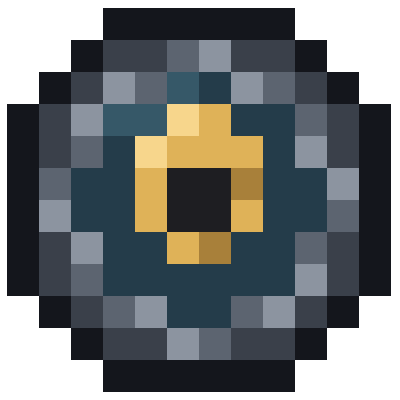
Windrift
Bedrock add-on listed for Minecraft 26.x (behavior + resource pack). File opened and checked on 28 Sep 2026; installs from the MC Bedrock Mods app on Android.
A cinematic, fully tunable camera for elytra flight — smooth banking, drift, and speed effects controlled from an in-game menu, no commands required.
⬇ Download on CurseForgeWindrift — Cinematic Elytra Camera
Turn ordinary elytra gliding into a cinematic flight experience. Windrift replaces your default first-person view while gliding with a smoothly following, physics-reactive camera: it banks into turns, drifts slightly with your momentum, widens its field of view as you pick up speed, and adds a light touch of wind and turbulence — all fully tunable from an in-game menu, without touching a single line of code.
Features
-Reactive camera — banks into turns, leans with dives and climbs, and adds a subtle field-of-view push at speed, instead of the static default elytra view.
-
In-game tuning menu — no commands to memorize, no config files. Everything is adjustable through simple, described menus.
-
Presets — Cinematic (smooth, dramatic, movie-like), Arcade (fast, punchy, exaggerated), Subtle (a light touch for players who just want a little more life in their flight).
-
Advanced tuning — for players who want to dial in the exact feel: roll speed, camera lag, vertical weight, air-burst strength, FOV cap, and shake threshold.
-
Beta features — optional, stronger variants of the core effects for players who want to push things further.
-
One-tap on/off switch — turn Windrift off at any time to fly plain vanilla elytra, without losing any of your saved settings. Turn it back on whenever you like.
-
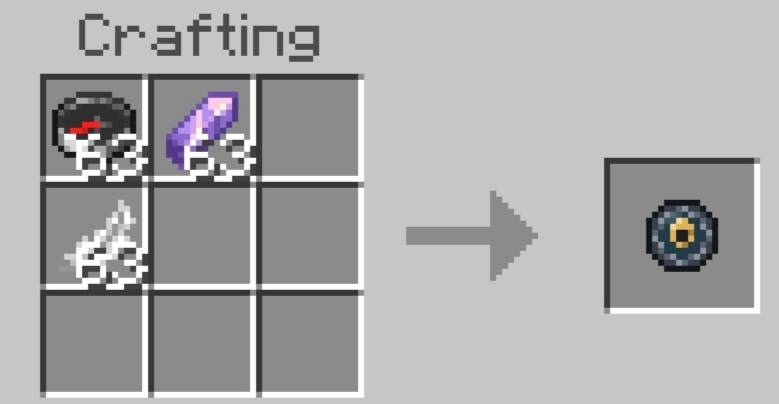
Flight Tuner item — a dedicated item that opens the menu with a simple right-click. You're given one automatically the first time you join a world with the addon installed, and you can craft more (Compass + Feather + Amethyst Shard).
-
Multiplayer-ready — every player gets their own independent camera and settings; one player's tuning never affects anyone else's.
How to open the menu
- Use the Flight Tuner item (easiest — right-click to open).
- Or run
/scriptevent windrift:menuin chat — works on any world, no setup needed.
Requirements
- Both the Behavior Pack and Resource Pack must be applied to your world.
- Works in singleplayer and multiplayer/Realms.
Installation
- Download the
.mcaddonfile. - Open it with Minecraft — it will install both the Behavior Pack and Resource Pack automatically.
- In your world settings, make sure both packs are applied (Behavior Packs and Resource Packs tabs).
- Join the world, equip your elytra, and start gliding.
A note on how this was made
Windrift was built with the help of AI coding assistants (ChatGPT and Claude), with every feature manually tested and tuned in-game across many iterations, and every reported bug tracked down to its actual root cause rather than guessed at. Wanted to be upfront about that.
Feedback
Found a bug, or have an idea for a future update? Feel free to leave a comment — this addon is actively maintained.
---
Windrift — Кинематографичная камера для полёта на элитрах
Обычный полёт на элитрах превращается в настоящее кинематографичное зрелище. Windrift заменяет стандартный вид от первого лица во время планирования на плавно следящую, реагирующую на физику камеру: она заваливается в поворотах, слегка "сносится" от инерции, расширяет обзор на скорости и добавляет лёгкий эффект ветра и турбулентности — и всё это полностью настраивается прямо в игре, через меню, без единой команды или файла конфигурации.
Возможности
- Реактивная камера — крен в поворотах, наклон при нырках и наборе высоты, лёгкое расширение обзора на скорости — вместо статичного стандартного вида на элитрах.
- Меню настроек прямо в игре — никаких команд наизусть, никаких конфигов. Всё регулируется через понятные, подписанные меню.
- Готовые пресеты — Cinematic (плавно, эффектно, как в кино), Arcade (быстро, резко, с акцентом на эффекты), Subtle (лёгкое усиление для тех, кому просто хочется немного "жизни" в полёте).
- Тонкая настройка — для тех, кто хочет подогнать всё под себя: скорость крена, задержка камеры, "вес" по вертикали, сила воздушных импульсов, потолок FOV, порог тряски.
- Beta-функции — необязательные, более выраженные версии базовых эффектов для тех, кто хочет ощущений посильнее.
- Переключатель в один тап — можно в любой момент выключить Windrift и летать на ванильных элитрах, не потеряв ни одной сохранённой настройки. Включить обратно — так же просто.
- Предмет-настройщик (Flight Tuner) — открывает меню по правому клику. Выдаётся автоматически при первом входе в мир с установленным аддоном, а ещё его можно скрафтить (компас + перо + осколок аметиста).
- Готов к мультиплееру — у каждого игрока своя независимая камера и свои настройки; тюнинг одного игрока никак не влияет на других.
Как открыть меню
- Использовать предмет Flight Tuner (самый простой способ — правый клик).
- Либо ввести в чате
/scriptevent windrift:menu— работает в любом мире без дополнительных настроек.
Требования
- К миру должны быть применены обе части: Behavior Pack и Resource Pack.
- Работает и в одиночной игре, и в мультиплеере/Realms.
Установка
- Скачайте файл
.mcaddon. - Откройте его через Minecraft — оба пака (поведения и ресурсов) установятся автоматически.
- В настройках мира убедитесь, что обе части применены (вкладки Behavior Packs и Resource Packs).
- Зайдите в мир, наденьте элитры и начинайте полёт.
О том, как это было сделано
Windrift был написан с помощью AI-инструментов (ChatGPT и Claude), при этом каждая функция вручную тестировалась и настраивалась прямо в игре через множество итераций, а каждый найденный баг разбирался до настоящей причины, а не исправлялся наугад. Решил сказать об этом прямо и честно.
Обратная связь
Нашли баг или есть идея для будущего обновления? Пишите в комментариях — аддон в активной поддержке.
- Edition: Minecraft Bedrock
- File type: .mcpack or .mcaddon
- Minecraft versions listed: 26.10, 26.11, 26.12
- How to install: Download the .mcpack or .mcaddon file. → Open it — Minecraft imports it. → In your world: Behavior Packs → Available → Activate, then the same under Resource Packs.
- Where to get it: Opens on CurseForge — not every file is mirrored on our own servers.
Install steps are the general flow for this file type — How to install Minecraft Bedrock addons & mods walks through it step by step.
- Pack type: .mcaddon — behaviour and resource pack in one file
- Manifest requires Minecraft 1.26.10 or newer
- Complete pack — everything it depends on is inside the file
- Download size: 32 KB
- Download link checked 29 Sept 2026 — working
These come from our own check of the pack file, not from the source page.