
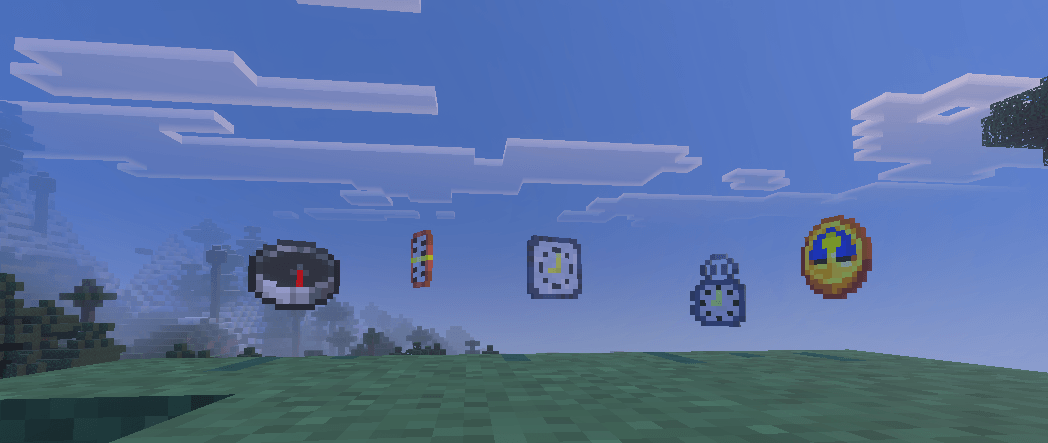
you ever think of the vanilla coordinates /day counter cover too much of the screen ?
Or wished the compass and clock were actually useful while exploring ?
Pingu's Instruments is here add new functionality for the vanilla compass and clock,and 3 BRAND-NEW ITEMS
Compass Changes :
- compass new show your x and z cordonate on actionbar with the cardinal points
- shift + right click to equip it in offhand
(compasses linked to a lodestone are not supported)
exemple: 
Clock Changes :
- now show in action bar the day and hour in the game world
- shift + right click to equip it in offhand
exemple:

And for the new items :
Altimeter : 
- Display the Y cordonate in action bar
- shift + right click to equip it in offhand
crafting recipe :
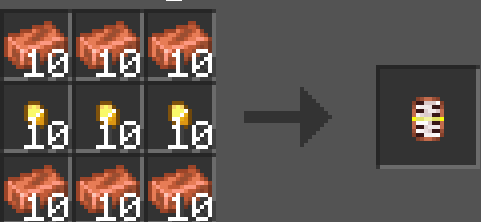
Speedometer : 
- Display the player moving speed
- shift + right click to equip it in offhand
crafting recipe :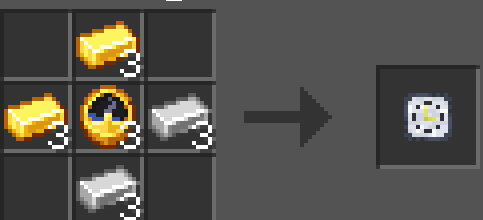
Chronometer : 
- click once to start a time
- click twice to stop the timer
- shift + right click to reset it
crafting recipe : 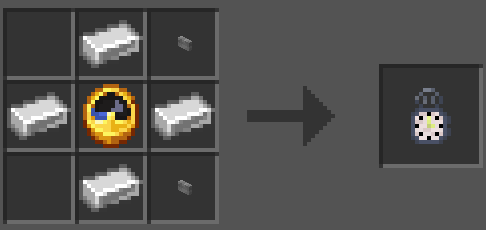
- Edition: Minecraft Bedrock
- File type: .mcpack or .mcaddon
- Minecraft versions listed: 26.20, 26.13, 26.30
- How to install: Download the .mcpack or .mcaddon file. → Open it — Minecraft imports it. → In your world: Behavior Packs → Available → Activate, then the same under Resource Packs.
- Where to get it: Opens on CurseForge — not every file is mirrored on our own servers.
Install steps are the general flow for this file type — How to install Minecraft Bedrock addons & mods walks through it step by step.
- Pack type: .mcaddon — behaviour and resource pack in one file
- Manifest requires Minecraft 1.21.90 or newer
- Complete pack — everything it depends on is inside the file
- Download size: 17 KB
- Download link checked 29 Sept 2026 — working
These come from our own check of the pack file, not from the source page.