
NexbyteWeb
Real-time web panel for Minecraft servers. Live TPS/RAM, player tools & inventory viewer. Paper, Purpur, Folia & Bukkit.
⬇ Download on Modrinth
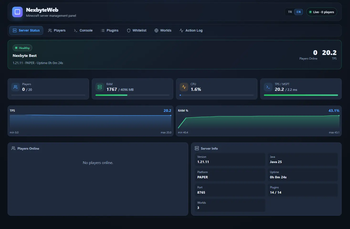
NexbyteWeb — Live Minecraft Server Web Panel
NexbyteWeb embeds a beautiful, real-time web management panel directly into your Minecraft server. No external hosting, no third-party dashboards, no extra setup — just drop the plugin in, start your server, and open your browser.
Think Aternos-style server management, but running on your own machine with full control, zero latency, and complete privacy.
The panel listens on 127.0.0.1 by default, so only people with access to the server machine can open it. Perfect for VPS owners, home server hosts, and anyone who wants a clean visual overview without exposing their server to the internet.
Why NexbyteWeb?
Running a Minecraft server usually means juggling the console, plugins, player complaints, and performance issues all at once. NexbyteWeb gives you a single, modern interface to see everything at a glance and take action instantly.
- Live data — WebSocket-powered updates every second, no page refresh
- Zero dependencies — works out of the box with only NexbyteWeb installed
- Bundled textures — item icons load from embedded 1.21.x texture pack, no CDN required
- Multi-platform — Paper, Purpur, Folia, Spigot, and Bukkit
- Folia-ready — region-safe schedulers for multi-threaded servers
- Lightweight — single JAR, ~8 MB, no database needed
Dashboard — Server Status
The main dashboard gives you a complete health overview of your server:
| Feature | Description |
|---|---|
| TPS & MSPT | Live ticks-per-second and milliseconds-per-tick with color-coded health indicators |
| RAM Usage | Used / max memory with percentage bar and history chart |
| CPU Load | Process CPU usage snapshot |
| TPS History | Sparkline chart of recent TPS values |
| RAM History | Sparkline chart of recent RAM usage |
| Performance Warnings | Automatic alerts for low TPS or high RAM |
| Online Players | Quick-view chips with name, ping, and gamemode |
| Server Info | Minecraft version, platform (Paper/Purpur/Folia), Java version (21–25), uptime, web port, plugin count, world count |
| MOTD | Server message of the day |
| Server Icon | Automatically reads server-icon.png from your server root and displays it in the panel header |
| Console Logs | Recent server log lines streamed into the panel |
| Plugin List | All loaded plugins with version and enabled/disabled status |
| World List | All worlds with environment, time, weather, and player count |
Players — Deep Player Management
Browse, search, and manage every online player from a modern card-based UI.
Player Overview
- Search players by name in real time
- View ping, gamemode, health, and hunger at a glance
- Vitals bars for health and food level
Player Detail Panel
- Location — world, X, Y, Z coordinates
- IP address — configurable (can be hidden in config)
- Gamemode — switch between Survival, Creative, Adventure, Spectator
- Quick actions — Heal, Feed, Kill, Kick
Custom Inventory Viewer
A fully custom-built inventory UI — not a static PNG overlay:
- Armor slots — helmet, chestplate, leggings, boots with durability bars
- Hotbar — 9 slots
- Main inventory — 27 slots
- Off-hand slot
- Enchantment glint — rendered correctly per item
- Item tooltips — display name, material, enchantments
- Bundled item textures — accurate 1.21.x icons from embedded texture pack
3D Character Preview
- Interactive 3D skin viewer powered by skinview3d
- Rotate and inspect the player's skin directly in the browser
Ender Chest
- View the player's ender chest contents with the same item slot UI
Optional Plugin Integrations
NexbyteWeb works perfectly on its own. When supported plugins are installed, extra data appears automatically — no configuration required.
| Plugin | Integration |
|---|---|
| AuthMe | Registration status, last login, registration date (when API available), last IP |
| LuckPerms | Primary group, all groups, permission nodes |
| SetHome / HomePlugin | Player home names and coordinates |
| Essentials / EssentialsX | Homes and ban history |
| GrimAC / GrimAntiCheat | Active violation levels per check |
All integrations use softdepend — if a plugin is missing or the API changes, NexbyteWeb logs a warning and continues running normally.
Server Management Actions
Take control of your server without typing commands:
- Whitelist — add or remove players
- Weather — toggle rain or clear skies
- Time — set day or night
- Action Log — every panel action is recorded with timestamp and details
All destructive actions (kill, kick) can be individually disabled in config.yml.
Platform & Version Support
| Supported | |
|---|---|
| Minecraft | 1.21.x (optimized for 1.21.1 – 1.21.11) |
| Java | 21, 22, 23, 24, 25 |
| Paper | ✅ |
| Purpur | ✅ |
| Folia | ✅ (region-safe scheduling) |
| Spigot | ✅ |
| Bukkit | ✅ |
Java version is detected automatically on startup. Supported runtimes (21–25) are logged to the console and shown in the dashboard.
Installation
- Download
NexbyteWeb-1.0.0.jar - Place it in your server's
plugins/folder - Start or restart the server
- Open your browser:
http://127.0.0.1:8765
That's it. No database, no extra plugins, no web server setup.
Optional: Server Icon
Place a server-icon.png (64×64 PNG) in your server root directory (next to server.properties). NexbyteWeb reads it automatically and uses it as the panel logo.
Port Already in Use?
If port 8765 is busy, NexbyteWeb automatically searches for the next available port (configurable range). The active port is shown in the dashboard and logged to console.
Configuration
All settings are in plugins/NexbyteWeb/config.yml:
web:
  enabled: true
  bind: "127.0.0.1"       # localhost only — do not expose without understanding the risks
  port: 8765
  auto-find-port: true
  port-search-range: 20
  update-interval-ms: 1000
  auto-open-browser: true

features:
  show-player-ip: true
  show-authme: true
  show-homes: true
  show-enderchest: true
  show-inventory: true
  show-luckperms: true
  show-ban-history: true
  show-grim-history: true

actions:
  allow-kill: true
  allow-gamemode-change: true
  allow-kick: true
  allow-message: true
  allow-teleport: true
  allow-whitelist: true
  allow-weather-time: true
Every feature and action can be toggled individually.
Security
NexbyteWeb is designed with security in mind:
- Localhost binding — panel listens on
127.0.0.1by default, not accessible from the internet - No authentication layer — because the panel is local-only, only users with machine access can open it
- Configurable bind address — advanced users can change
bindin config, but should understand the security implications before exposing the panel to a network - Action toggles — disable kill, kick, whitelist, or any action you don't want available in the panel
Warning: Do not change
bindto0.0.0.0on a public server without adding your own authentication or firewall rules. The panel has full server management capabilities.
Technical Details
- Embedded web server — Javalin (Jetty) runs inside the plugin process
- Frontend — TypeScript + Vite, bundled into the JAR at build time
- Live updates — WebSocket hub pushes server status and action logs
- Texture pack — embedded
textures/1.21.11/resources, no external CDN - Rate limiting — API endpoints are rate-limited to prevent abuse
- Folia support — uses region-aware and global schedulers correctly
Comparison
| NexbyteWeb | External panels (e.g. Pterodactyl) | |
|---|---|---|
| Setup | Drop JAR, done | Install panel software, configure |
| Hosting | Runs inside your server | Separate web server required |
| Cost | Free | Often requires VPS + panel hosting |
| Privacy | 100% local | Data sent to external service |
| Real-time | WebSocket, ~1s updates | Varies |
FAQ
Does this work without any other plugins? Yes. NexbyteWeb is fully functional with only Paper/Purpur/Folia/Bukkit installed.
Can I access the panel from another computer?
By default, no — it binds to localhost. You can change bind in config, but add proper security first.
Does it work on Folia? Yes. NexbyteWeb uses Folia-compatible schedulers for all server operations.
Does it support Java 25? Yes. Java 21 through 25 are supported and detected automatically.
Will it lag my server? The panel collects data on a configurable interval (default 1 second) using async schedulers. Impact is minimal on modern hardware.
Support & Feedback
Found a bug? Have a feature request? Leave a comment on the Modrinth page or open an issue.
NexbyteWeb — Your server. Your browser. Full control.
- Edition: Minecraft Java
- File type: .jar
- Minecraft versions listed: 1.21, 1.21.1, 1.21.2
- How to install: Install the matching mod loader (Forge, Fabric or NeoForge) for your Minecraft version. → Download the .jar. → Put it in the .minecraft/mods folder and launch that loader profile.
- Where to get it: Opens on Modrinth — not every file is mirrored on our own servers.
Install steps are the general flow for this file type — How to install Minecraft Java mods & modpacks walks through it step by step.
- Ships as NexbyteWeb-1.0.0.jar — drop this file into the mods folder
- Download size: 7.8 MB
- Download link checked 10 Sept 2026 — working
These come from our own check of the pack file, not from the source page.