
goated shard
Java mod listed for Minecraft 1.20–1.21. Downloads from the MC Java Mods app on Android.
A lightweight economy plugin with a command-based shop GUI, kill rewards with per-player cooldowns, and full config control. Supports Paper, Folia &…
⬇ Download on Modrinth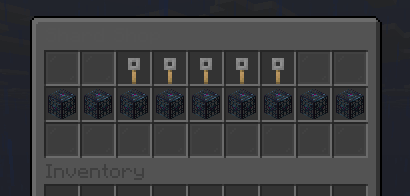
ShardPlugin - Currency, Shop & Kill Rewards
A lightweight, fully configurable economy plugin with a command-based shop GUI, kill rewards, and per-player cooldowns. Every item in the shop runs purely from commands - no physical item giving, no dependencies on other plugins.
Features
- Command-based shop GUI with spawners and keys
- Kill rewards with configurable per-victim cooldown
- Full config control - all items, prices, colors, and commands in config.yml
- No SmartSpawner or external plugin dependencies
- PlaceholderAPI support (%shards_balance%)
- Reload command (/shards reload)
- Supports Paper, Folia & Purpur
Shop GUI
- Interactive shop with buy confirm screen
- Configurable GUI size (9-54 slots)
- Configurable filler glass
- Inline refresh - GUI stays open after purchase
- Spawners show purple names by default, customizable per item
- Keys with custom model data support
- Enchant glint option per item
- Cross-version sound support
Commands
/shard - Check your balance /shard pay - Send shards to another player (shard.members) /shard balance - Check another player's balance (shards.admin) /shard give - Give shards (shards.admin) /shard giveall - Give shards to all players (shards.admin) /shard set - Set a player's balance (shards.admin) /shard take - Take shards from a player (shards.admin) /shard reload - Reload config and save balances (shards.admin) /shardshop - Open the shop GUI (shard.members)
Permissions
shard.members - Default: true - Basic commands (balance, pay, shop) shards.admin - Default: op - Admin commands (give, giveall, set, take, reload)
Kill Rewards
- Configurable shard reward per kill
- Configurable cooldown per killer-victim pair (supports s/m/h/d suffixes)
- Silent cooldown skip - no spam messages
- No suicide rewards
Configuration
Everything is controlled from config.yml:
- Kill reward amount and cooldown
- Shop title, size, and filler slots
- Spawner items with slot, price, name color, commands, and enchant option
- Key items with slot, name, material, custom model data, price, and commands
- Colors are fully customizable per item
Versions
Paper 1.20.5 - 1.21.11 | Folia | Purpur Requires Java 21
- Edition: Minecraft Java
- File type: .jar
- Minecraft versions listed: 1.20.5, 1.20.6, 1.21
- How to install: Install the matching mod loader (Forge, Fabric or NeoForge) for your Minecraft version. → Download the .jar. → Put it in the .minecraft/mods folder and launch that loader profile.
- Where to get it: Opens on Modrinth — not every file is mirrored on our own servers.
Install steps are the general flow for this file type — How to install Minecraft Java mods & modpacks walks through it step by step.
- Ships as ShardPlugin-1.0.0.jar — drop this file into the mods folder
- Download size: 29 KB
- Download link checked 30 Sept 2026 — working
These come from our own check of the pack file, not from the source page.