Axiom Pilot
Toggleable pilot mode for the Axiom editor: fly with the camera on your mouse and use tools, drag gizmos, and paint at the crosshair.
⬇ Download on Modrinth
Pilot adds a toggleable first-person camera mode to the Axiom editor. Flip it on and the cursor is captured: the camera follows your mouse like vanilla Minecraft, WASD flies, and the crosshair becomes your cursor. No more holding a mouse button just to look around.
| Pilot off | Pilot on |
|---|---|
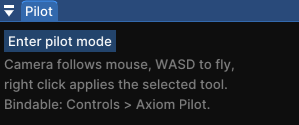 |
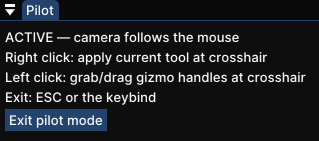 |
While piloting
- 🎯 Right click applies your selected tool at the crosshair. Painting, sculpting and other brush tools work with full stroke preview
- 🕹️ Left click grabs and drags gizmo handles: path tool points, selection cuboid faces, and more
- ↩️ Undo/redo and Axiom keybinds keep working as usual
- 🚪 ESC or the keybind exits instantly
Axiom has this only as a hold (right click with no tool active). Pilot makes it a toggle, and your active tool stays usable the whole time.
Toggle it
- Bind "Toggle Pilot Mode" in vanilla Controls (category "Axiom Pilot"), or
- Use the small Pilot window inside the editor. It never steals your toolbar selection

Support
Bug reports and suggestions: https://discord.gg/XpPFSMVF9Y.
- Edition: Minecraft Java
- File type: .jar
- Minecraft version listed: 1.21.11
- How to install: Install the matching mod loader (Forge, Fabric or NeoForge) for your Minecraft version. → Download the .jar. → Put it in the .minecraft/mods folder and launch that loader profile.
- Where to get it: Opens on Modrinth — not every file is mirrored on our own servers.
Install steps are the general flow for this file type — How to install Minecraft Java mods & modpacks walks through it step by step.
- Ships as axiom-pilot-1.0.0.jar — drop this file into the mods folder
- Download size: 11 KB
- Download link checked 30 Sept 2026 — working
These come from our own check of the pack file, not from the source page.