
I fully realize that similar mods already exist, but I wanted to try creating something like this myself. Apologies for the long introduction, but let me tell you what this mod actually adds!
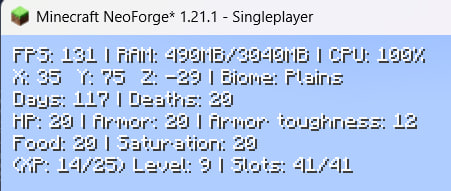
This mod adds several HUD elements to your screen, including:
Performance & Location:
- FPS, RAM, CPU
- Coordinates, and the biome you are in.
- Day counter, death counter
Player Info:
- Health, hunger, and saturation
- Armor and armor toughness
- Current level (with a progress counter to the next level) and item slots (works with inventory, armor, and off-hand)
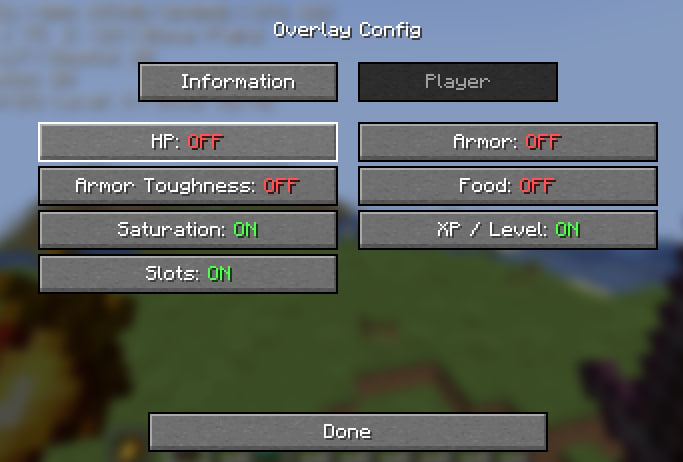
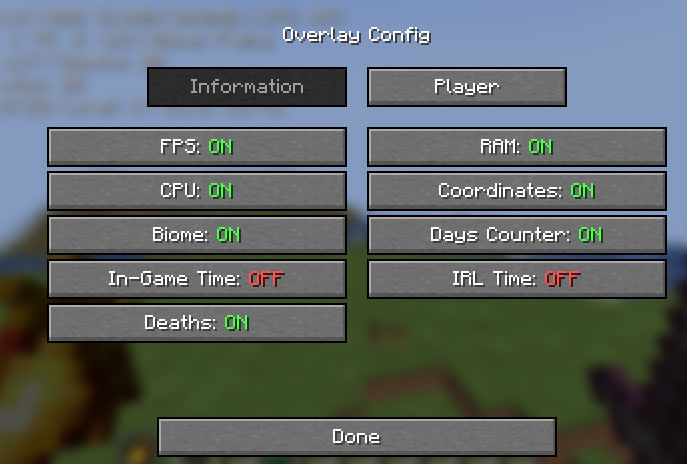
If you only want to keep specific elements like FPS, RAM, and the day counter, you can easily do so everything is fully customizable in the config mod.
Basically, I finally made a mod I've wanted for a long time. Again, I know there are plenty of other options out there, but I built this to display exactly what I personally like to see on screen without having to track or calculate it manually.
Anyway, thanks for reading, and I hope you enjoy the mod!
- Edition: Minecraft Java
- File type: .jar
- Minecraft version listed: 1.21.1
- How to install: Install the matching mod loader (Forge, Fabric or NeoForge) for your Minecraft version. → Download the .jar. → Put it in the .minecraft/mods folder and launch that loader profile.
- Where to get it: Opens on Modrinth — not every file is mirrored on our own servers.
Install steps are the general flow for this file type — How to install Minecraft Java mods & modpacks walks through it step by step.
- Ships as OverlayPerspective-1.0-neoforge-1.21.1.jar — drop this file into the mods folder
- Download size: 204 KB
- Download link checked 10 Sept 2026 — working
These come from our own check of the pack file, not from the source page.