
Cerv Dark Theme
Java mod listed for Minecraft 1.21. Downloads from the MC Java Mods app on Android.
Makes the red Mojang loading screen dark - with fully customisable colors, bar, logo tint, and fade durations.
⬇ Download on Modrinth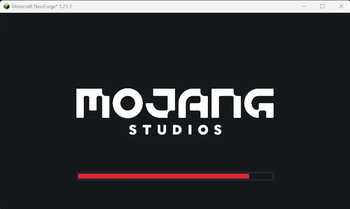
CervDarkTheme
Tired of the bright red Mojang loading screen burning your eyes every launch? CervDarkTheme turns it dark - and lets you restyle every part of it to match your setup.
✨ Features
- 🌑 Dark by default - deep dark background (
#14181C) instead of vanilla red (#EF323D) - 🎨 Full color customisation with an in-game color picker:
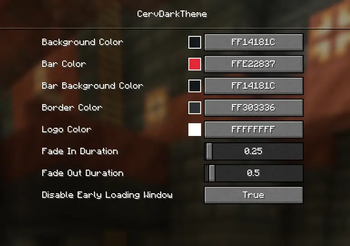
- Background
- Progress bar fill
- Bar background (unfilled part)
- Bar border
- Mojang Studios logo tint
- ⏱️ Adjustable fade-in / fade-out durations - make the loading screen snappier
- 🖥️ Client-side only - safe to use on any server, no server install needed
⚙️ Configuration
Open the config GUI in-game via Mods → CervDarkTheme → Config (powered by
Fzzy Config), or edit
config/cervdarktheme/config.toml directly.
| Setting | Default |
|---|---|
| Background Color | #14181C |
| Bar Color | #E22837 |
| Bar Background Color | #14181C |
| Border Color | #303336 |
| Logo Color | #FFFFFF |
| Fade In Duration | 0.25s |
| Fade Out Duration | 0.5s |
Early loading window handled automatically
NeoForge normally shows its own red-themed early loading window. CervDarkTheme
automatically sets earlyWindowControl = false in config/fml.toml for you -
no manual editing needed. The change applies from the second launch onward
(the loader reads that file before mods load). You can opt out via the
"Disable Early Loading Window" config option.
- Edition: Minecraft Java
- File type: .jar
- Minecraft version listed: 1.21.1
- How to install: Install the matching mod loader (Forge, Fabric or NeoForge) for your Minecraft version. → Download the .jar. → Put it in the .minecraft/mods folder and launch that loader profile.
- Where to get it: Opens on Modrinth — not every file is mirrored on our own servers.
Install steps are the general flow for this file type — How to install Minecraft Java mods & modpacks walks through it step by step.
- Ships as cervdarktheme-1.0.0.jar — drop this file into the mods folder
- Download size: 15 KB
- Download link checked 21 Oct 2026 — working
These come from our own check of the pack file, not from the source page.