
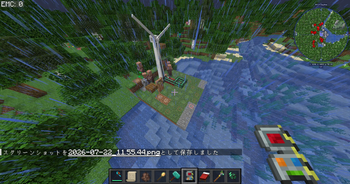
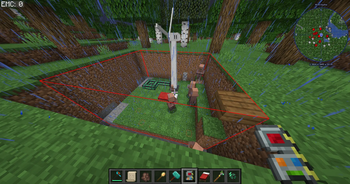
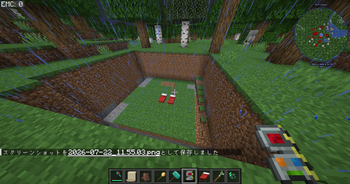
BG2 Cut All is an addon for Building Gadgets 2.
It extends the Cut & Paste Gadget so you can move more than just normal blocks.
Features
- Allows cutting blocks that Building Gadgets 2 normally denies (beds, doors, etc.)
- Cuts and pastes nearly all entities in the selected area (paintings, item frames, armor stands, mobs, and more)
- Skips players and short-lived entities (lightning, fishing bobbers, etc.)
Requirements
- Minecraft 1.20.1
- Forge
- Building Gadgets 2 (required)
Install this mod on both client and server.
How to use
- Install Building Gadgets 2 and this addon
- Use the Cut Paste Gadget as usual
- Beds, doors, and entities in the selection are included when possible
Notes
- Multi-block structures (beds/doors) may still behave oddly in some cases
- Large cuts can lag or take a long time
- Entity paste may appear a few seconds after blocks finish placing
- This does not replace Building Gadgets 2; it is an addon
Credits
- Building Gadgets 2 by Direwolf20
- Addon by Mametaro
Dependencies
- Required: Building Gadgets 2 (CurseForge only) https://www.curseforge.com/minecraft/mc-mods/building-gadgets
Note: Building Gadgets is not officially available on Modrinth. Please download it from CurseForge separately.
BG2 Cut All は Building Gadgets 2 用のアドオンです。
Cut & Paste ガジェットで、通常のブロック以外もまとめて扱えるようにします。
機能
- Building Gadgets 2 が通常カットできないブロック(ベッド・ドアなど)に対応
- 選択範囲内のほぼすべてのエンティティをカット/ペースト(絵画、額縁、防具立て、モブなど)
- プレイヤーや、雷・釣り糸など一瞬で消えるエンティティは対象外
動作環境
- Minecraft 1.20.1
- Forge
- Building Gadgets 2(必須)
クライアントとサーバーの両方に入れてください。
使い方
- Building Gadgets 2 と本アドオンを導入
- いつも通り Cut Paste ガジェットを使う
- 可能ならベッド・ドア・エンティティも一緒にカットされます
注意
- ベッド/ドアなどの複数ブロックは、環境によって挙動がおかしくなることがあります
- 大きな範囲のカットは重くなったり、時間がかかることがあります
- エンティティはブロック配置のあと、少し遅れてスポーンすることがあります
- Building Gadgets 2 の代わりではなく、追加のアドオンです
クレジット
- Building Gadgets 2 by Direwolf20
- Addon by Mametaro
依存関係
- 必須: Building Gadgets 2(CurseForge のみ) https://www.curseforge.com/minecraft/mc-mods/building-gadgets
※ Building Gadgets は公式では Modrinth に公開されていません。 別途 CurseForge から導入してください。
Quick facts
- Edition: Minecraft Java
- File type: .jar
- Minecraft version listed: 1.20.1
- How to install: Install the matching mod loader (Forge, Fabric or NeoForge) for your Minecraft version. → Download the .jar. → Put it in the .minecraft/mods folder and launch that loader profile.
- Where to get it: Opens on Modrinth — not every file is mirrored on our own servers.
Install steps are the general flow for this file type — How to install Minecraft Java mods & modpacks walks through it step by step.
Verified by MCModsHub
- Ships as bg2cutall-1.0.0.jar — drop this file into the mods folder
- Download size: 33 KB
- Download link checked 10 Sept 2026 — working
These come from our own check of the pack file, not from the source page.