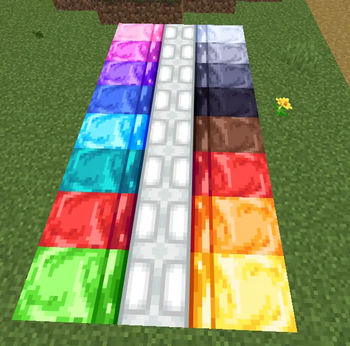
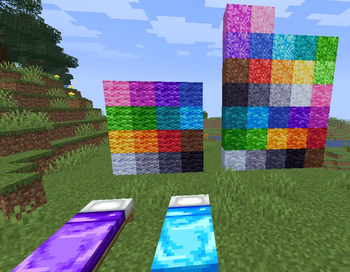
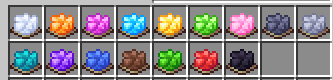
ONE TEXTURE COLOR (example pack)
CHECK THE GALLERY!! Everything works using only a few textures btw, the textures are really ugly and rushed because this is purely an example pack for those who want to experiment with it, many things can be done with this and i havent seen no one making it
This is a EXAMPLE Resource pack made really quick for the transmute palette function for Atlases in minecraft
This feature allow you to add textures in one singlecolor, so all blocks/items of this type uses the exact same texture (only one file) but applying different colors (in this pack, it is gray)


and all these textures will be "dyed" and applied to some specific blocks (in this pack, its terracotta, wool, concrete, concrete powder and beds)
To add more textures and blocks, you need to add the original texture to the item/block atlas depending on what it is
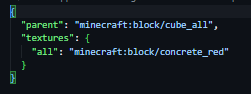
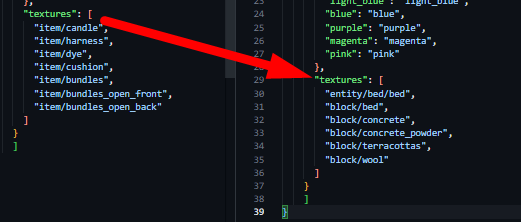 Then, youll need to change the item/block model, just to change its texture to "item_color" or "block_color" the original texture will be the prefix and the color will be the suffix for example, in the image there is "block/concrete" so the "red_concrete.json" in "models/block" will have to look like this
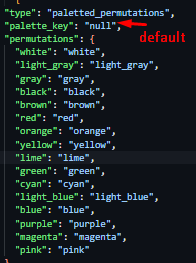
To control the colors, you have to add them in the atlas and a texture in the palette folder, the gray one used for the default textures is named "null.png" the others are vanilla colors. It is important that all the palette textures have the same resolution/amount of colors

OBS: This pack also makes beds use the entity folder and the old format from before 26.3 Special thanks to @ioblackshaw [enchanted_games]
- Edition: Minecraft Java
- File type: .zip (resource pack)
- Minecraft versions listed: 1.21, 1.21.1, 1.21.2
- How to install: Download the .zip resource pack — do not unzip it. → Put it in .minecraft/resourcepacks. → Enable it in Options → Resource Packs.
- Where to get it: Opens on Modrinth — not every file is mirrored on our own servers.
Install steps are the general flow for this file type — How to install Minecraft Java resource packs walks through it step by step.
- Downloads as 0neTextureColor.zip
- Download size: 83 KB
- Download link checked 10 Sept 2026 — working
These come from our own check of the pack file, not from the source page.