
Golden pack
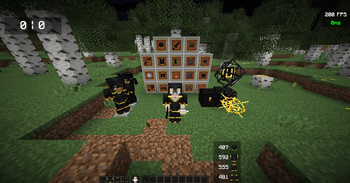
You Need a good PVP texture pack and you love Gold and black ? Then you are right here! I made texture packs for cpvp, normal PVP, cart PVP, Uhc and more…
⬇ Download on Modrinth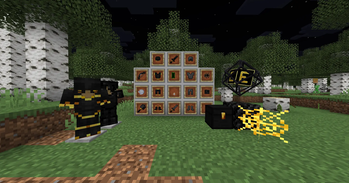
PvP Texture Pack
A clean and optimized PvP texture pack designed for all Minecraft PvP game modes.
Features
- Optimized textures for competitive gameplay
- Clear and easy-to-see items
- Smooth visuals with improved visibility
- Perfect for UHC, Crystal PvP, Netherite PvP, Sword PvP, BedWars, SkyWars, and many other PvP modes
- Lightweight design for a better gameplay experience
Supported Game Modes
- UHC
- Crystal PvP
- Netherite PvP
- Sword PvP
- BedWars
- SkyWars
- Duels
- Practice PvP
- And many more
About
This texture pack was created for players who want a clean, modern, and competitive PvP experience. The pack improves visibility while keeping Minecraft’s original style, making it suitable for both casual and competitive players.
Installation
- Download the texture pack.
- Open Minecraft.
- Go to Options → Resource Packs.
- Click “Open Pack Folder”.
- Move the downloaded file into the folder.
- Enable the pack in-game and enjoy!
Thank you for downloading and using this PvP Texture Pack!
- Edition: Minecraft Java
- File type: .zip (resource pack)
- Minecraft version listed: 1.21.11
- How to install: Download the .zip resource pack — do not unzip it. → Put it in .minecraft/resourcepacks. → Enable it in Options → Resource Packs.
- Where to get it: Opens on Modrinth — not every file is mirrored on our own servers.
Install steps are the general flow for this file type — How to install Minecraft Java resource packs walks through it step by step.
- Downloads as CAAS_V1 (5).zip
- Download size: 11.7 MB
- Download link checked 10 Sept 2026 — working
These come from our own check of the pack file, not from the source page.