
Visual Drops & Cosmetics
Turns grounded drops into interactive 3D displays with partial pickup, preserved components, falling physics, and lockable valuables.
⬇ Download on Modrinth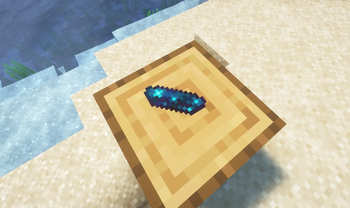
EN
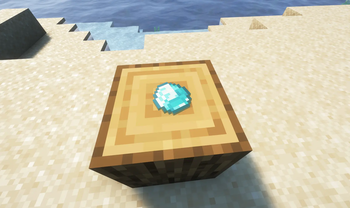
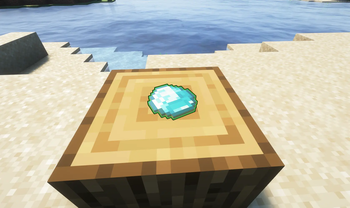
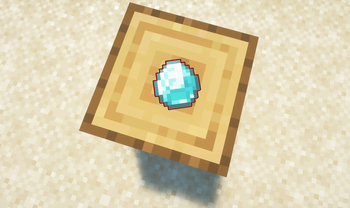
Visual Drops & Cosmetics replaces grounded vanilla item entities with polished 3D displays and interaction hitboxes while preserving the complete item stack.
Visual and interaction changes
- Block-like and flat items receive more natural ground poses.
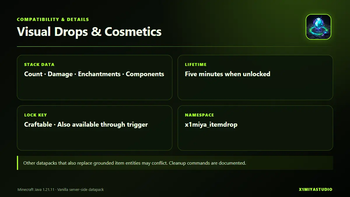
- Item count, damage, enchantments, and custom components are preserved.
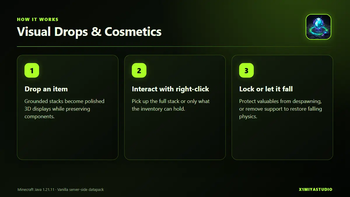
- Players pick grounded displays up with right-click.
- If the inventory has only partial space, the remaining count stays visible on the ground.
- A full inventory leaves the item in place and shows feedback.
- Removing the supporting block returns the item to falling physics until it settles again.
- Unlocked drops keep the vanilla-style five-minute lifetime.
Because this datapack replaces the presentation and pickup flow of grounded item entities, other datapacks that also replace or heavily modify dropped items may conflict.
XS Lock Key
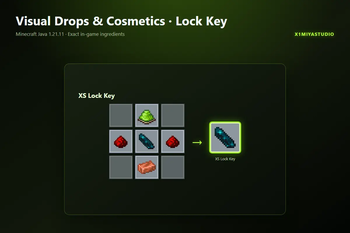
The XS Lock Key is crafted with lime dye, redstone, an echo shard, and a copper ingot. Hold the key and right-click a grounded display to toggle its lock.
- Locked drops receive visual feedback.
- Locked drops do not despawn after five minutes.
- Unlocking restores the normal lifetime.
- Non-operators can request a key with
/trigger x1di.lock_key. - Operators can use
/function x1miya_itemdrop:tool/give_lock_key.
The exact crafting recipe is shown in the project gallery.
Uninstall and cleanup
Pick up important displayed items before removal. If an operator needs to remove remaining internal display entities, use:
kill @e[tag=x1di.display]
kill @e[tag=x1di.hitbox]
kill @e[tag=x1di.internal]
After cleanup, remove the ZIP and run /reload.
Installation
- Download one language version.
- Place the ZIP in
<world>/datapacks/. - Enter the world or run
/reload. - Drop a disposable block and flat item to verify the display and pickup behavior.
Compatibility
- Minecraft Java Edition 1.21.11
- Vanilla datapack; data pack format 94.1
- Server side required; no client mod or resource pack
- No dependencies
- License: All Rights Reserved
- Designed around vanilla dropped items and their components
Visual Drops & Cosmetics is an independent X1miyaStudio project created by X1miya. It is not an official Minecraft product. All Rights Reserved.
RU
Визуальные предметы и косметика заменяет лежащие ванильные сущности предметов аккуратными 3D-моделями и зонами взаимодействия, сохраняя полный стак.
Изменения отображения и взаимодействия
- Блоки и плоские предметы получают более естественное положение на земле.
- Количество, урон, зачарования и пользовательские компоненты сохраняются.
- Лежащие модели подбираются по нажатию ПКМ.
- Если в инвентаре есть место только для части стака, остаток остаётся видимым на земле.
- При полном инвентаре предмет остаётся на месте и показывает обратную связь.
- После удаления опорного блока предмет снова использует физику падения до следующего приземления.
- Незаблокированные предметы сохраняют ванильное время жизни около пяти минут.
Датапак меняет отображение и подбор лежащих сущностей предметов, поэтому другие датапаки, которые также заменяют или сильно изменяют дропы, могут конфликтовать.
XS Ключ блокировки
XS Ключ создаётся из лаймового красителя, редстоуна, осколка эха и медного слитка. Держи ключ и нажми ПКМ по лежащей модели, чтобы переключить блокировку.
- Заблокированные предметы показывают визуальную обратную связь.
- Заблокированные предметы не исчезают через пять минут.
- Разблокировка возвращает обычное время жизни.
- Игрок без прав оператора может получить ключ через
/trigger x1di.lock_key. - Оператор может использовать
/function x1miya_itemdrop:tool/give_lock_key.
Точный рецепт показан в галерее проекта.
Удаление и очистка
Перед удалением подбери важные отображаемые предметы. Если оператору нужно убрать оставшиеся внутренние сущности, используй:
kill @e[tag=x1di.display]
kill @e[tag=x1di.hitbox]
kill @e[tag=x1di.internal]
После очистки удали ZIP и выполни /reload.
Установка
- Скачай одну языковую версию.
- Помести ZIP в
<мир>/datapacks/. - Зайди в мир или выполни
/reload. - Выброси ненужный блок и плоский предмет, чтобы проверить отображение и подбор.
Совместимость
- Minecraft Java Edition 1.21.11
- Ванильный датапак; формат 94.1
- Требуется на сервере; клиентский мод и ресурспак не нужны
- Зависимости отсутствуют
- Лицензия: All Rights Reserved
- Рассчитан на ванильные выброшенные предметы и их компоненты
Визуальные предметы и косметика — независимый проект X1miyaStudio, созданный X1miya. Это не официальный продукт Minecraft. Все права защищены.
- Edition: Minecraft Java
- File type: .jar
- Minecraft version listed: 1.21.11
- How to install: Install the matching mod loader (Forge, Fabric or NeoForge) for your Minecraft version. → Download the .jar. → Put it in the .minecraft/mods folder and launch that loader profile.
- Where to get it: Opens on Modrinth — not every file is mirrored on our own servers.
Install steps are the general flow for this file type — see the MC Java Mods guides for the full walkthrough.
- Downloads as Visual_Drops_and_Cosmetics_1.21.11_EN.zip
- Download size: 2.2 MB
- Download link checked 10 Sept 2026 — working
These come from our own check of the pack file, not from the source page.