
Dialog Password Hider
I don't know my version or loader
EN
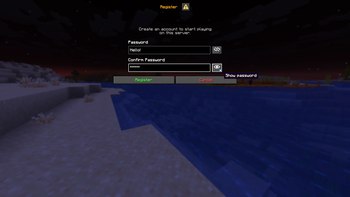
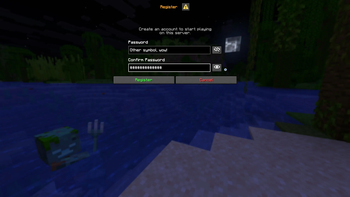
This simple client-side Fabric mod hides your password when you type in new dialog screens!
How it works?
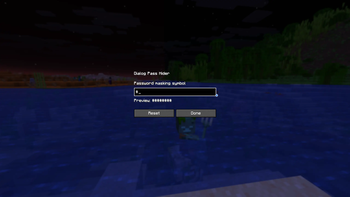
When dialog appears, all text entered in the password field will hide, using "*" symbol. (or any other, which you can change in mod settings)
Requirements
Fabric Loader 0.19.3 or newer
Important Note! This mod was written with AI assistance. May expect some errors or bugs. If you encounter bugs, please report them using Issue Tracker.
RU
Этот простой клиентский мод для Fabric скрывает пароль при вводе текста в новых диалоговых окнах!
Как он работает?
При появлении диалогового окна весь текст, вводимый в поле пароля, будет скрываться за символом «*» (или любым другим, который можно выбрать в настройках мода)
Зависимости
Fabric Loader 0.19.3 или новее
Важное примечание! Этот мод был создан с поддержкой ИИ. Возможны недочеты или баги. Если вы столкнетесь с ошибками, пожалуйста, сообщите о них через Issue Tracker.
- Edition: Minecraft Java
- File type: .jar
- Minecraft versions listed: 1.21.6, 1.21.7, 1.21.8
- How to install: Install the matching mod loader (Forge, Fabric or NeoForge) for your Minecraft version. → Download the .jar. → Put it in the .minecraft/mods folder and launch that loader profile.
- Where to get it: Opens on Modrinth — not every file is mirrored on our own servers.
Install steps are the general flow for this file type — How to install Minecraft Java mods & modpacks walks through it step by step.
- Ships as dialog-pass-hider-2.1.0-mc1.21.6-1.21.8.jar — drop this file into the mods folder
- Download size: 15 KB
- Download link checked 11 Sept 2026 — working
These come from our own check of the pack file, not from the source page.