
Tales and Tails
Tales & Tails Name tags make a mob yours . Tales & Tails makes it someone . Give any named mob a Tale — a story you write yourself. Maybe it likes…
⬇ Download on Modrinth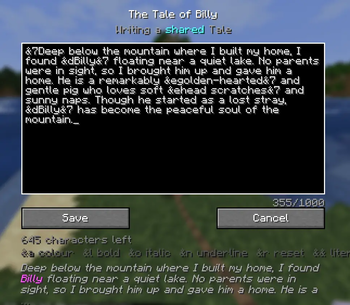
Tales & Tails
Name tags make a mob yours. Tales & Tails makes it someone.
Give any named mob a Tale — a story you write yourself. Maybe it likes carrots. Maybe it followed you home from the Nether. Maybe you're still not over what its family did. Whatever the story is, it's now part of your world.
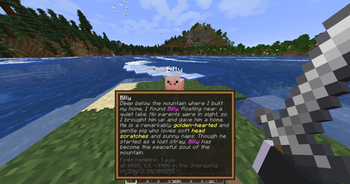
And the world writes the other half for you. Every Tale keeps a Record: the biome, the coordinates, the day, and the name of whoever met the mob first. Look back years later and you'll know exactly where the story began.
How it works
- Name a mob with a name tag, like always.
- Look at it and press
Kto open the writer. - Write anything you like — colours and formatting supported.
- From then on, sneak and look at the mob to read its story on a card.
That's it. No crafting, no menus to hunt through, no setup.
When they're gone, the story stays
Mobs don't live forever. When one carrying a Tale dies, it leaves behind an Epitaph — an item holding the whole story and a final line: "Died on Day 507, killed by a Creeper." Frame it. Store it in a chest. Carry it to another world. Right-click to read it. Epitaphs can't be crafted — only earned.
Works on any server
Tales & Tails is fully client-side. You don't need it installed on the server, and neither does anyone else. It works on vanilla servers, Realms, and anywhere in between — your Tales are saved locally, per world.
If the server does run the mod, Tales become shared: everyone can read each other's stories, and whoever named a mob owns its Tale so nobody can overwrite it. The mod figures out which mode it's in automatically.
Features
- Write lore on any named mob — a keybind, no items to craft
- Colour and formatting with
&codes, with a live preview as you type - Automatic Record — biome, coordinates, dimension, and day, captured once
- Sneak to read — a clean card fades in below your crosshair
- Epitaphs — the story survives the mob, as a real item you can keep
- The Memorial — browse every story you've written in this world
- Ownership on servers — your Tales are yours; nobody overwrites them
- Renaming keeps the story — lore is bound to the mob, not its name
- Armor stands too — perfect for labelling builds and museums
- Mod Menu config — reading distance, permissions, keybinds, and more
Client-side. No server install required.
- Edition: Minecraft Java
- File type: .jar
- Minecraft version listed: 26.2
- How to install: Install the matching mod loader (Forge, Fabric or NeoForge) for your Minecraft version. → Download the .jar. → Put it in the .minecraft/mods folder and launch that loader profile.
- Where to get it: Opens on Modrinth — not every file is mirrored on our own servers.
Install steps are the general flow for this file type — How to install Minecraft Java mods & modpacks walks through it step by step.
- Ships as talesandtails-1.0.0.jar — drop this file into the mods folder
- Download size: 1.2 MB
- Download link checked 11 Sept 2026 — working
These come from our own check of the pack file, not from the source page.