
Custom Hitsounds
Custom sounds for Minecraft. Import any MP3, WAV or OGG, or record your own. Customize hits, crits, totem pops, kills and 14 total actions.
I don't know my version or loader
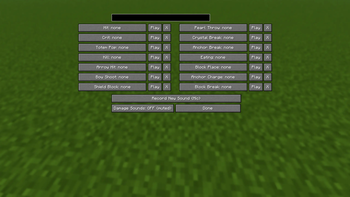
Custom Hitsounds
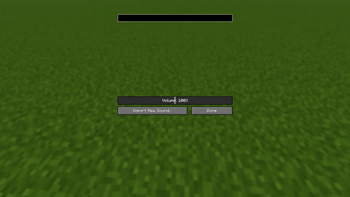
Any sound, on most actions, open the menu, click import, pick any MP3, WAV or OGG straight from your downloads, or skip files entirely and record your own voice with your mic, directly in-game.
14 Combat Actions
Give every action its own sound:
- Hit / Crit
- Kill
- Totem Pop
- Arrow Hit
- Bow Shoot, Shield Block, Pearl Throw
- Crystal Break, Anchor Break, Anchor Charge
- Eating, Block Place, Block Break
Each action has its own volume slider and a choice to replace the vanilla sound or play on top of it.
Import Anything
The Import button opens your file explorer. Pick a sound, and it's instantly ready to assign. Files are checked when you import them, so a broken file just tells you why instead of silently not working.
Record Your Own
Hit Record New Sound, get a 3-2-1 countdown, say anything, click to finish. Your recording shows up in your sound library like any other sound assign it to a kill, a totem pop, whatever you want.
Requirements
- Fabric Loader
- Fabric API
- Edition: Minecraft Java
- File type: .jar
- Minecraft versions listed: 26.1, 26.1.1, 26.1.2
- How to install: Install the matching mod loader (Forge, Fabric or NeoForge) for your Minecraft version. → Download the .jar. → Put it in the .minecraft/mods folder and launch that loader profile.
- Where to get it: Opens on Modrinth — not every file is mirrored on our own servers.
Install steps are the general flow for this file type — How to install Minecraft Java mods & modpacks walks through it step by step.
- Ships as CustomHitsounds-0.1.0+26.1-26.1.2.jar — drop this file into the mods folder
- Download size: 178 KB
- Download link checked 11 Sept 2026 — working
These come from our own check of the pack file, not from the source page.