HomeJavaModsEverything HUD
Everything HUD
ModsJava

Everything HUD

One intelligent HUD that explains everything, instead of displaying everything at once.

⬇ Download on Modrinth
Everything HUD — screenshot 1

E HUD — Everything, exactly when it matters

One intelligent HUD for animals, mobs, blocks, storage, machines, farms, redstone, building, the world, the player, and multiplayer.

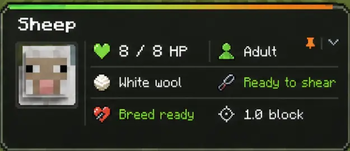
E HUD is a lightweight, context-sensitive information and diagnostics HUD for Minecraft: Java Edition. Instead of covering the screen with permanent counters, it watches what you are looking at and presents the information that matters for that exact situation. Look at an animal to understand health, age, breeding, ownership, and behavior. Look at a machine to see inputs, fuel, outputs, state, and warnings. Look at a block to understand orientation, support, fluids, storage, redstone, or danger. When there is nothing useful to explain, E HUD stays quiet.

The default panel appears just above the hotbar, close enough to read without pulling attention away from the world. Its visual identity uses neon green with neon orange accents, soft gradients, icons, and lightweight motion. Every important part of that appearance can be changed.

E HUD is designed as Vanilla Plus: immediately useful, visually clean, and respectful of normal gameplay. It does not reveal server secrets or invent values the client has not received. It organizes information Minecraft already exposes into a clearer, more helpful interface.


Why use E HUD?

Minecraft contains an enormous amount of useful state, but much of it is scattered across animations, debug screens, block textures, entity behavior, menus, and technical knowledge. E HUD brings that information together without forcing the player to memorize every signal.

E HUD aims to replace a collection of narrow overlay mods with one coherent system: one visual language, one configuration screen, one profile format, and one set of performance controls.


Automatic contextual inspection

Automatic inspection is enabled by default. E HUD evaluates the entity or block under the crosshair, then builds a compact panel from information relevant to that target. The panel changes as the target changes, and irrelevant lines disappear automatically.

Players who prefer manual control can bind the optional Inspect action. The Pin action holds an inspection on screen. The configuration key is also available in Minecraft's Controls menu, but E HUD intentionally ships with no forced key assignments. This prevents collisions with existing control setups.

Support development

E HUD remains publicly available. If you would like development updates, public feature polls, behind-the-scenes previews, early builds, and supporter benefits, you can support Oolist Development Studios on Patreon:

Support Oolist on Patreon

Verified by MCModsHub

These come from our own check of the pack file, not from the source page.

Explore more