
EclipseFX
Java mod listed for Minecraft 1.21. Downloads from the MC Java Mods app on Android.
EclipseFX is a cinematic aura and particle effects engine for RPG, MMORPG, anime, fantasy, and progression servers, featuring layered auras, live…
⬇ Download on Modrinth

EclipseFX
A cinematic RPG aura & visual effects engine for Minecraft. by ArcalithStudios
EclipseFX is not "just a particle plugin." It's a layered, in-game aura identity engine built for MMORPG, anime, fantasy, cultivation, dungeon, class-based, magic and progression servers. Players equip magical auras, anime power effects, cultivation rings, spell circles, combat trails, wings, orbitals, halos, ground runes and awakening bursts — each built from stacked, trigger-driven visual layers that server owners can create, edit, preview, import and export entirely in-game, no coding required.
✨ Features
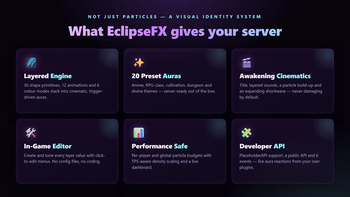
- Layered aura engine — every aura is a stack of independent layers (ground rune + orbitals
- idle flare + awakening pulse) instead of a single canned effect.
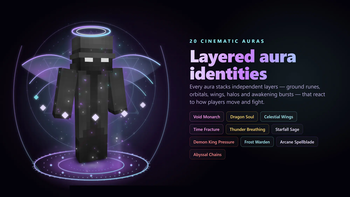
- 20 original preset auras — Void Monarch, Heavenly Ascension, Demon King Pressure, Dragon Soul, Thunder Breathing, Celestial Wings, Time Fracture and more.
- 30 shape primitives — rings, spirals, helixes, halos, orbitals, wings, ground runes, spheres, domes, blade orbits, dragon coils, soul chains, constellations, floating glyphs…
- 12 animations & 6 colour modes — rotate, pulse, rise, orbit, expand, spiral, gradient, rainbow, transition and more.
- Trigger system — layers react to idle, walking, sprinting, sneaking, jumping, damage, kills, mining, low health and other states.
- Anime awakening cinematics — title, layered sounds, an inward particle build-up and an expanding shockwave, then the aura equips. Never damaging by default.
- In-game aura editor — tweak every layer value (shape, particle, colour, motion, trigger, performance) with click-to-edit controls.
- RPG class aura groups — resolve a player's class via permission, PlaceholderAPI or manual assignment, and show class-specific auras.
- Live previews, favorites & per-player visibility toggles.
- Performance-first — per-player and global particle budgets, TPS-aware density scaling, per-world disabling, and a live performance dashboard.
🎮 Commands
Players — /aura
| Command | Description |
|---|---|
/aura |
Open the aura menu |
/aura equip <aura> |
Equip an aura |
/aura preview <aura> |
Preview an aura |
/aura toggle |
Toggle your aura's visibility |
/aura favorites |
Open your favorites |
/aura awaken <aura> |
Play an awakening cinematic |
Admins — /eclipsefx — dashboard, reload, performance, create/clone/delete/import/export
auras, give/take unlocks, awaken players, manage classes, and the in-game editor.
Full tab-completion on every command.
🔐 Permissions
eclipsefx.menu— open the aura menu (default: everyone)eclipsefx.admin— full accesseclipsefx.aura.<id>/eclipsefx.category.<category>/eclipsefx.rarity.<rarity>— unlock auras by id, category or rarity- Granular nodes for editor, create, delete, give/take, awaken, preview and class management.
🧩 Integrations
- PlaceholderAPI (optional) —
%eclipsefx_equipped_aura%,%eclipsefx_aura_rarity%,%eclipsefx_auras_unlocked%,%eclipsefx_player_class%,%eclipsefx_performance_mode%and more. - Developer API —
EclipseFXAPIplus 6 Bukkit events. Fire aura reactions from your own RPG/skill/quest plugins viatriggerAuraEffect(player, trigger).
📦 Requirements
| Server | Paper 1.21.3+ (Paper/Purpur) |
| Java | 21 |
| Optional | PlaceholderAPI |
SQLite is bundled — no database setup required. No other dependencies.
🚀 Installation
- Drop
EclipseFX.jarinto yourplugins/folder. - Start the server — configs and the 20 preset auras generate automatically.
- (Optional) Install PlaceholderAPI for placeholders.
- Edit the configs and run
/eclipsefx reload.
⚙️ Configuration
Fully configurable via config.yml, messages.yml (MiniMessage), themes.yml,
performance.yml, classes.yml, storage.yml, permissions.yml and per-aura files in
auras/.
💬 Support
Found a bug or have a suggestion? Open a ticket on the ArcalithStudios support channel.
Free to use on any server. Made with care by ArcalithStudios.
- Edition: Minecraft Java
- File type: .jar
- Minecraft versions listed: 1.21, 1.21.1, 1.21.2
- How to install: Install the matching mod loader (Forge, Fabric or NeoForge) for your Minecraft version. → Download the .jar. → Put it in the .minecraft/mods folder and launch that loader profile.
- Where to get it: Opens on Modrinth — not every file is mirrored on our own servers.
Install steps are the general flow for this file type — How to install Minecraft Java mods & modpacks walks through it step by step.
- Ships as EclipseFX.jar — drop this file into the mods folder
- Download size: 13.9 MB
- Download link checked 1 Oct 2026 — working
These come from our own check of the pack file, not from the source page.