ModsJava
Tab WEB Editor
TAB web editor that can automatically connect to your tab config so you can edit your tab config via web with scoreboard templates
⬇ Download on Modrinth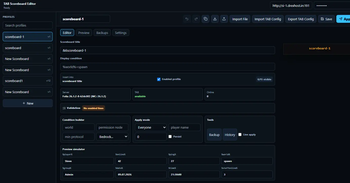
TAB Web Editor
TAB Web Editor adds a modern web-based scoreboard editor for the TAB Minecraft plugin. It lets server owners edit scoreboard profiles from a browser, preview changes live, and apply updates to the server without restarting.
Features
- Embedded web editor hosted directly by the Minecraft server
- Drag-and-drop scoreboard line editor
- Live Minecraft-style scoreboard preview
- Edit titles, lines, placeholders, colors, and profile conditions
- Add, remove, duplicate, enable, and disable lines
- Full scoreboard templates for Lobby, Survival, Lifesteal, Prison, Skyblock, and Minigames
- Import local TAB
config.ymlfiles from your browser - Import/export the server’s
plugins/TAB/config.yml - Save profiles to the plugin backend
- Apply changes instantly in game
- Apply to everyone, one test player, temporarily, or persist to TAB config
- Backup and version history browser
- First-time setup screen with API key setup
- API key roles: read, editor, and admin
- Optional IP allowlist
- Folia, Paper, Purpur, and Spigot support
- Low-memory embedded Java web server
Requirements
- Java 17+
- Minecraft server running Spigot, Paper, Purpur, or Folia
- TAB plugin installed
- A server host that allows opening/allocating the editor web port
Commands
/tabeditor url
/tabeditor key
/tabeditor key reset
/tabeditor doctor
/tabeditor reload
/tabeditor backup
/tabeditor import
/tabeditor export
/tabeditor apply <profile>
Quick facts
- Edition: Minecraft Java
- File type: .jar
- Minecraft versions listed: 1.17, 1.17.1, 1.18
- How to install: Install the matching mod loader (Forge, Fabric or NeoForge) for your Minecraft version. → Download the .jar. → Put it in the .minecraft/mods folder and launch that loader profile.
- Where to get it: Opens on Modrinth — not every file is mirrored on our own servers.
Install steps are the general flow for this file type — How to install Minecraft Java mods & modpacks walks through it step by step.
Verified by MCModsHub
- Ships as tab-web-editor-1.0.0.jar — drop this file into the mods folder
- Download size: 435 KB
- Download link checked 11 Sept 2026 — working
These come from our own check of the pack file, not from the source page.