
How the mod works
- Effects that DON'T care about potency like night vision or fire resistance have square frame.
- Effects that DO care about potency like strength (which increases damage as much as potent it is) have circular frames.
- Neutral effects like glowing/omens have yellow background.
- Vanilla potion lists are removed from both inventory and HUD, because they're replaced by moodles.
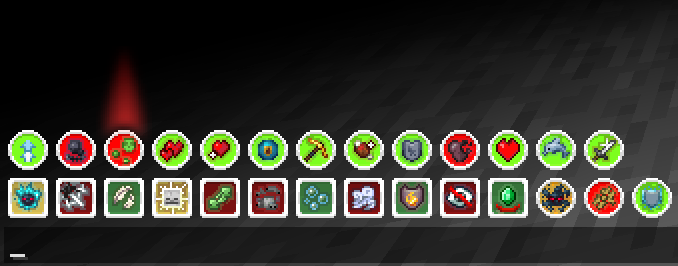
- Dynamic lines and rows rendering to avoid z-fighting with hotbar.
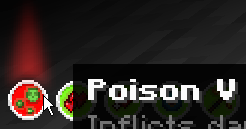
- Funni, yet informative descriptions (hopefully 🥀)
- Animations exactly like in our favorite Casualties: Unknown
- Effect potency affect the background color (example: level 1 - plain gray background)
- Starting from level 5, all negative effects will have that red light, see at screenshots.
- [ You can make effects use c:u display logic (positive - square frame, neutral/bad - circle) ]
btw, you can make your own moodle textures!! if you feel like that
Feel free to open issues on GitHub if you need Moodles support for 'Tough as Nails' or any other mod.. Or if you'll find bugs.. Or if you have a suggestion.
(Русские, чирканите на гитхаб если вам нужна русская локализация)
Also you can just dm me in discord, that way i'll update mod even faster, cause i don't check github often.
Moodles in-game
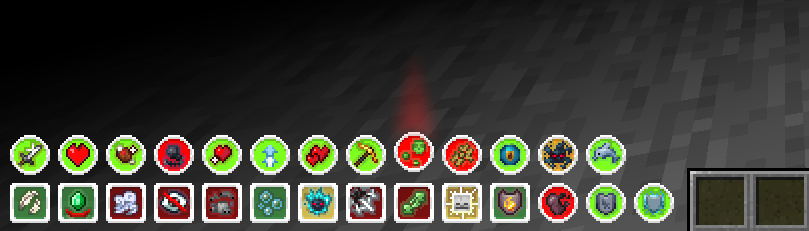
Red light above moodle when effect's level is >= 5
Moodles slide up smoothly on opening chat
Moodles descriptions (they have easter eggs btw)

CREDITS
Effects descriptions: Minecraft Wiki by wiki community.
Moodles idea and frames asset: Casualties: Unknown on Steam are made by and belong to Orsoniks.
Effect icons are downscaled + slightly edited versions of minecraft effect icons and belong to Mojang Studios.
orsoniks, please don't employ nintendo lawyers to sue me, if you want my mod to be removed - just say so😭🙏
Quick facts
- Edition: Minecraft Java
- File type: .jar
- Minecraft version listed: 1.21.11
- How to install: Install the matching mod loader (Forge, Fabric or NeoForge) for your Minecraft version. → Download the .jar. → Put it in the .minecraft/mods folder and launch that loader profile.
- Where to get it: Opens on Modrinth — not every file is mirrored on our own servers.
Install steps are the general flow for this file type — How to install Minecraft Java mods & modpacks walks through it step by step.
Verified by MCModsHub
- Ships as moodles-1.1+1.21.11.jar — drop this file into the mods folder
- Download size: 51 KB
- Download link checked 12 Sept 2026 — working
These come from our own check of the pack file, not from the source page.