
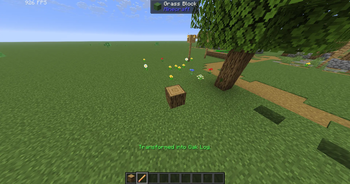
HernsShapeshifter
Turn into almost any Minecraft block!
How to use:
1. Press H to open the block menu. 2. Choose a block to transform. 3. Select player form in the menu to turn back. 4. Press L while standing on the ground to lock yourself to the block grid. Press L again to unlock.
ShapeShifter Wand:
Click “Get Wand” in the block menu. Hold the wand and right-click any block to become it instantly.
Features:
- Mobs ignore you while you are a block. - Your hitbox matches the block. - Blocks use biome colors and world lighting. - Special blocks such as water, lava, fire, cactus, and magma have matching effects. - Your health, inventory, armor, and abilities stay unchanged.
Requirements:
Requires Minecraft 1.21.11, Fabric Loader, and Fabric API.
For multiplayer, the mod must be installed on both the server and every player’s computer.
- Edition: Minecraft Java
- File type: .jar
- Minecraft version listed: 1.21.11
- How to install: Install the matching mod loader (Forge, Fabric or NeoForge) for your Minecraft version. → Download the .jar. → Put it in the .minecraft/mods folder and launch that loader profile.
- Where to get it: Opens on Modrinth — not every file is mirrored on our own servers.
Install steps are the general flow for this file type — How to install Minecraft Java mods & modpacks walks through it step by step.
- Ships as HernsShapeshifter-1.4.0.jar — drop this file into the mods folder
- Download size: 1.7 MB
- Download link checked 12 Sept 2026 — working
These come from our own check of the pack file, not from the source page.