KeyMap HUD
A visual keybinding manager for Minecraft that helps you find conflicts, discover unused keys, rebind controls, add custom key labels, and save or share…
⬇ Download on Modrinth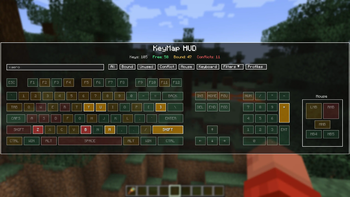
KeyMap HUD
A visual keybinding manager for Minecraft Fabric.
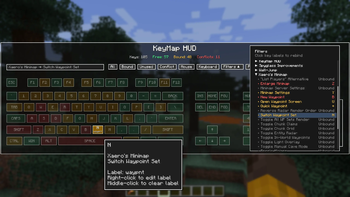
KeyMap HUD provides an interactive keyboard and mouse overlay that makes it easy to see, understand, and manage your Minecraft keybindings. Quickly find conflicting keybinds, discover unused keys, search through actions, and organize different control setups with profiles.
▶ See a showcase of the features of KeyMap HUD on YouTube
Features
Visual Keyboard & Mouse HUD
View your keybindings directly on a complete visual keyboard and mouse layout.
Keys are color-coded to make your controls easy to understand at a glance:
- Green — Unused key
- Amber — One action bound
- Red — Conflicting bindings
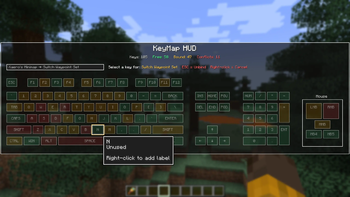
Hover over a key to see its assigned actions and additional information.
Conflict Detection
Immediately identify keys assigned to multiple actions, making it much easier to resolve conflicts in large modpacks.
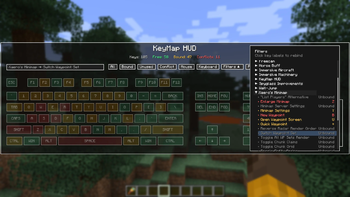
Search & Filtering
Search your controls and filter keybindings by:
- Conflicts
- Free/unused keys
- Bound keys
- Mouse buttons
- Categories
- Individual mods
KeyMap HUD also supports search prefixes such as mod: and cat: for more targeted searches.
Key Rebinding
Select an action and visually choose the key you want to assign to it. Available keys are highlighted to make finding a good binding easier while still allowing you to intentionally create conflicting bindings when desired.
Safe Conflicts
Not every keybinding conflict is actually a problem. KeyMap HUD lets you mark intentional conflicts as safe, changing the key from red to amber so it no longer appears as an active conflict.
Safe conflicts are automatically cleared if one of the bindings is reassigned or if another binding is added to the key, ensuring new conflicts are still brought to your attention. You can also manually clear the safe status at any time.
Custom Key Labels
Give individual keys custom labels that appear directly on the KeyMap HUD keyboard.
Custom labels make it easy to identify important controls at a glance without needing to remember what every key is assigned to. Labels can be added, edited, or removed directly from the key tooltip and are saved as part of your KeyMap HUD configuration.
This is especially useful for large modpacks where a key's function may not be obvious from the key itself.
Keybinding Profiles
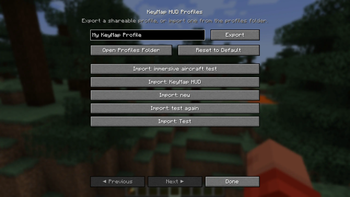
Create and manage multiple keybinding profiles for different playstyles or mod setups.
Profiles can be:
- Created
- Renamed
- Duplicated
- Deleted
- Switched without manually rebuilding your entire control layout
Designed for Modded Minecraft
KeyMap HUD is especially useful for large modpacks where dozens—or even hundreds—of actions may compete for a limited number of convenient keys.
Current version
- Minecraft 1.21.1
Additional version support may be considered in the future.
Dependencies
- Mod Menu
Use Mod Menu to change settings and export/import profiles
- Edition: Minecraft Java
- File type: .jar
- Minecraft version listed: 1.21.1
- How to install: Install the matching mod loader (Forge, Fabric or NeoForge) for your Minecraft version. → Download the .jar. → Put it in the .minecraft/mods folder and launch that loader profile.
- Where to get it: Opens on Modrinth — not every file is mirrored on our own servers.
Install steps are the general flow for this file type — How to install Minecraft Java mods & modpacks walks through it step by step.
- Ships as keymaphud-1.0.0.jar — drop this file into the mods folder
- Download size: 82 KB
- Download link checked 12 Sept 2026 — working
These come from our own check of the pack file, not from the source page.