HomeJavaModsLia's media Player
Lia's media Player
ModsJava

Lia's media Player

This mod adds the possibility to play media from link in chat

⬇ Download on Modrinth
Lia's media Player — screenshot 1Lia's media Player — screenshot 2Lia's media Player — screenshot 3Lia's media Player — screenshot 4

Lia's Media player

For Minecraft 1.21.1 · NeoForge · Client-side only

Lia's Media player is a companion mod that can display medias that you can interact — right inside Minecraft, without ever leaving the game.


What it does at a glance

When a link to an image or video appears in chat, the mod quietly replaces the raw URL with a short, colored label:


Pictures and GIFs

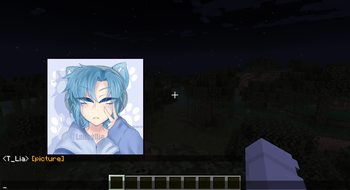
Hover to preview. Open your chat and move the mouse over any [picture] label. A preview of the image pops up right above your cursor — no clicking, no browser, no tabbing out. The image is downloaded the first time you hover and then kept ready, so it appears instantly after that. Animated GIFs play in the preview.

Supported images. Standard picture files work out of the box: PNG, JPG/JPEG, GIF, and BMP.

Tenor GIFs. The mod figures out the real animated GIF behind the tenor page automatically and shows it for you — these appear as a [gif] label.

Pin it on screen. Want to keep a picture up while you keep playing or chatting? Click to pin it as its own little window. Pinned images can be:

Previews and pinned windows are automatically scaled down to fit comfortably on your screen, never blown up past their real size.


Videos

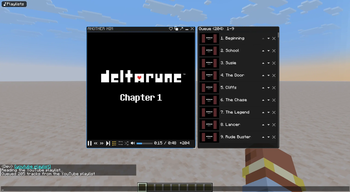
Click a video label and the mod opens a real, working video player inside Minecraft — with sound. Hovering over a video label provides a handy tooltip reminder of your options.

What it can play:

The player window gives you full controls:

A built-in queue. Instead of cluttering your screen with a new window for every link, extra videos are added to the current player's queue. When one finishes (or you press next), the window automatically swaps to the next video in place. The queue panel shows each entry's thumbnail and its real video name (the actual YouTube title, or the file name), so you can tell what's coming up at a glance.

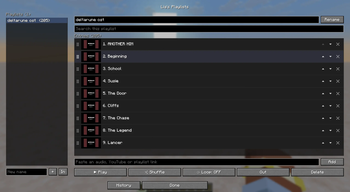
In-Game Playlists GUI (/liasmediaplayer playlists)

Keeps playing in the background. Hide a player, and it keeps running — audio and all — so you can listen while you play. Close it with the × button when you're done. While no menu or chat screen is open, visible video windows stay drawn on your HUD so a clip keeps showing during normal gameplay.

Everything just works. Video playback relies on two small helper tools: ffmpeg (to decode video and sound) and yt-dlp (to play YouTube links). If you don't already have them, the mod quietly downloads the official copies into its own folder when the game starts — so you don't have to set anything up. If you do have them installed, the mod finds them automatically in the usual places.


Audio

Click an [audio] label and the mod opens a small audio bar — just the track name and a row of controls — so you can listen without a big window in the way. Hovering over an audio label will provide a tooltip reminder to click it.

What it can play:

The bar gives you:

A built-in queue, just like videos. Click more audio links, and they line up behind the current one; the bar plays them one after another and the time read-out shows how many are waiting (a little +N). The volume is shared with the video player, so one setting controls everything.

Keeps playing in the background. Hide the bar and the music keeps going; while no menu is open it stays on your HUD showing the track name. The same top-left button that brings hidden videos back works for hidden audio bars too.


Playlists

Open the Playlists button in the top-left of your chat (or bind a key for it — see below) to manage saved playlists.

Your playlists are saved to disk, so they're still there next time you play.


Mod Options

The mod now features a configurable options menu where you can tailor its behavior to your liking.


Keybinds

The mod adds keys you can set in Options → Controls → "Lia's Media Player" to drive the players without opening chat:

They're unbound by default so they never clash with your existing keys — just assign whatever you like.

Chat Commands

You can also start playing media directly via chat commands without receiving a link first:


Why you'll like it


Lia's Media Player is a client-side convenience mod. It only affects how shared image, video, and audio links appear in your own chat — it does not modify gameplay, the world, or other players.

Verified by MCModsHub

These come from our own check of the pack file, not from the source page.

Explore more