
NeoCocoa
Java mod listed for Minecraft 1.20. Downloads from the MC Java Mods app on Android.
Support IME - Input Method Editor (Chinese, Japanese, Korean and more) in Minecraft on Multi-platforms (macOS, Windows, Wayland, X11).
⬇ Download on Modrinth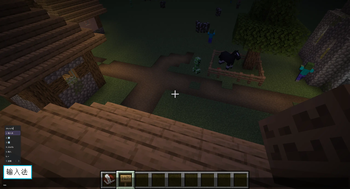
NeoCocoa
Support IME - Input Method Editor (Chinese, Japanese, Korean and more) in Minecraft on Multi-platforms (macOS, Windows, Wayland, X11).
A hard fork of https://github.com/nakanotti/CocoaInput, which is a fork of https://github.com/Axeryok/CocoaInput.
Notice: X11 support is buggy, partially broken and deprecated. Please use Wayland for a better experience.
Compiling
NeoCocoa's Gradle build script handles native library build, the build method is similar to common mods. However, some additional setup is needed.
The Git repo uses Git submodule. Please clone with --recursive, or run git submodule update --init --recursive if you already cloned.
Zig is required for build with native.
OSXCross is needed on non-MacOS Unix like platforms.
Setup osxcross envvars with osxcross-conf >> ~/.bashrc. Please use osxcross branch 2.0-llvm-based.
MSVC or Mingw is needed for Windows build.
If you don't want to build native library in Gradle build process, just set SKIP_NATIVE_BUILD envvar.
Compile native library
NeoCocoa needs native-platform libraries to work. This process is done by Gradle, but here are some references if you want to compile it manually.
To compile them, install zig, then run: zig build [windows|wayland|x11|darwin] [options]
You may want -Dmacos-sdk-path=$OSXCROSS_SDK on osxcross.
You can use zig build windows -Dwindows-arch=aarch64 [other_options] to build for Windows On Arm.
Installing
NeoCocoa is published on Modrinth. The official binaries includes native libs for these targets:
- Windows x86_64
- GNU/Linux x86_64, glibc
- MacOS 11.0
If your OS is not included, please compile it yourself, then put it to /path/to/minecraft/mods/../native/, and create an empty file called <lib name>.keep, for example libwaylandcocoainput.so.keep.
NeoCocoa requires NeoForge or Fabric.
This mod uses Java Native Access (Apache License 2.0).
License
Minecraft Mod Public License
- Edition: Minecraft Java
- File type: .jar
- Minecraft version listed: 1.20.1
- How to install: Install the matching mod loader (Forge, Fabric or NeoForge) for your Minecraft version. → Download the .jar. → Put it in the .minecraft/mods folder and launch that loader profile.
- Where to get it: Opens on Modrinth — not every file is mirrored on our own servers.
Install steps are the general flow for this file type — How to install Minecraft Java mods & modpacks walks through it step by step.
- Ships as neococoa-neoforge-1.0.0-1.20.1.jar — drop this file into the mods folder
- Download size: 116 KB
- Download link checked 2 Oct 2026 — working
These come from our own check of the pack file, not from the source page.