Questing Librarians
Questing Librarians is a Fabric mod for Minecraft 26.2 that removes lectern rerolling in favor of exploration. inspired by Grian Hermitcraft
⬇ Download on Modrinth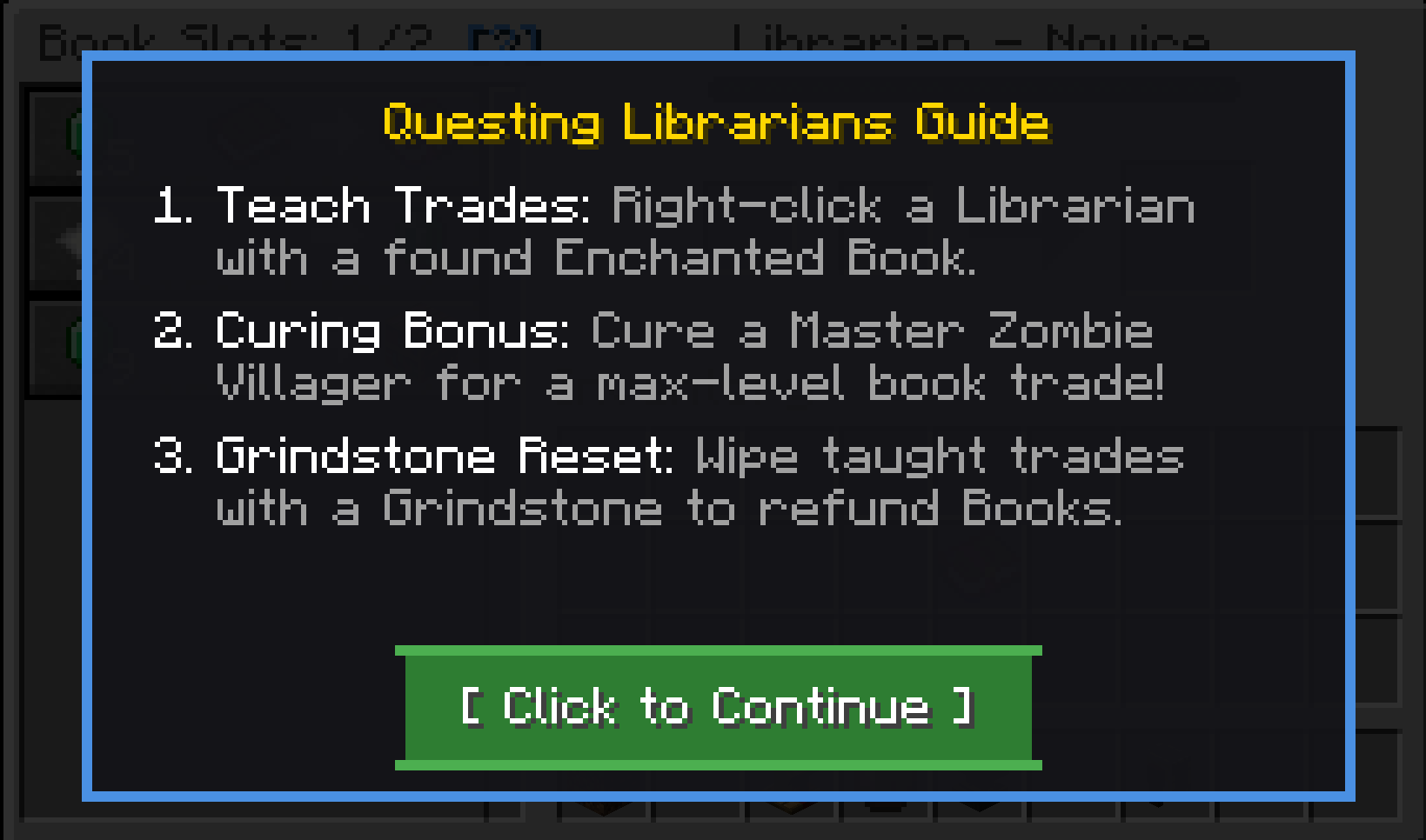
Questing Librarians
Questing Librarians changes how villagers trade enchanted books. Instead of breaking and replacing a lectern hundreds of times until you get the enchantment you want, Librarians no longer sell random enchanted books by default.
Instead, you bring enchanted books you've found while exploring, fishing, or enchanting, and teach them directly to Librarians. You can also cure Master-level Zombie Villagers to unlock special max-level trades.
Features
No Random Lectern Rerolling
Librarian trade pools are adjusted so random enchanted books never appear on new villagers. Standard trades like paper, bookshelves, glass, compasses, and lanterns are unchanged.
Teaching Trades
Right-click a Librarian while holding an Enchanted Book you found in the world to teach them that trade permanently. Books bought from other villagers are marked as traded and cannot be used to teach other Librarians.
In-Place Trade Upgrades
If a Librarian already knows an enchantment and you teach them a higher level of it (for example, Protection IV when they already have Protection II), the existing trade is upgraded in-place without taking up a new trade slot.
Inventory Tooltips
Enchanted Books show clear status tooltips in your inventory:
Can Teach Librarians (Found Book)for books found from loot, fishing, or crafting.Cannot Teach Librarians (Traded Book)for books purchased from villagers.Cured Reward Tradefor special trades unlocked via curing.
Resetting Trades with Grindstones
Right-clicking a Librarian with a Grindstone resets all player-taught trades and returns regular books to your inventory. Trades unlocked from curing Master villagers are preserved and won't be wiped.
Level 5 Curing Rewards
Curing a Master (Level 5) Zombie Villager gives them a random max-level Enchanted Book trade and unlocks an extra trade slot (up to 4 total book trades). This reward happens once per villager.
Guaranteed Zombification
Villagers killed by zombies always convert into Zombie Villagers, regardless of difficulty settings.
Admin Configuration GUI (Bedrock Compatible)
The mod includes an in-game configuration menu for server admins to adjust balance settings without editing config files manually.
- Command:
/qlconfig(requires level 2 / admin permissions) - Bedrock Compatibility: Uses standard chest inventory menus, making it fully functional for Bedrock Edition players via GeyserMC.
- Controls: Left-click slots to toggle options or increase numbers; right-click to decrease numbers.
Available Settings
- Disable Curing Discounts: Toggle whether villager curing discounts apply.
- Allow Grindstone Unlearning: Enable or disable wiping taught trades with a Grindstone.
- Allow Trade Upgrading: Enable or disable upgrading existing trades in-place.
- Guarantee Zombification: Enable or disable 100% zombification on villager death.
- Curing Reward: Enable or disable the free trade reward when curing Master villagers.
- Max Books (Normal 1-4): Max taught books for levels 1 to 4 (Default: 2).
- Max Books (Master): Max taught books for Level 5 Master villagers (Default: 3).
- Max Books (Cured): Max taught books for cured Master villagers (Default: 4).
- Base Emerald Cost: Starting emerald cost for taught books (Default: 15).
- Discount Per Level: Emerald discount applied per villager level (Default: 2).
- Curing Reward Min Level: Minimum villager level required to grant a curing reward (Default: 5).
- Curing Reward Emerald Cost: Emerald cost for cured reward trades (Default: 7).
How It Works
- Find an Enchanted Book through dungeon loot, fishing, or an enchantment table.
- Check the tooltip to ensure it says
Can Teach Librarians. - Right-click a Librarian with the book to add it to their trade list.
- Level up your Librarian to reduce trade costs and unlock more book slots.
- If you want to change a villager's taught trades, right-click them with a Grindstone to get your books back.
Installation
- Minecraft Version: 26.2
- Mod Loader: Fabric Loader 0.19.3+
- Dependencies: Fabric API
Place the mod .jar into your .minecraft/mods directory alongside Fabric API.
- Edition: Minecraft Java
- File type: .jar
- Minecraft version listed: 26.2
- How to install: Install the matching mod loader (Forge, Fabric or NeoForge) for your Minecraft version. → Download the .jar. → Put it in the .minecraft/mods folder and launch that loader profile.
- Where to get it: Opens on Modrinth — not every file is mirrored on our own servers.
Install steps are the general flow for this file type — How to install Minecraft Java mods & modpacks walks through it step by step.
- Ships as questing-librarians-5.0.0.jar — drop this file into the mods folder
- Download size: 53 KB
- Download link checked 12 Sept 2026 — working
These come from our own check of the pack file, not from the source page.