HomeJavaModsMy Action Bar
My Action Bar
ModsJava

My Action Bar

My Action Bar is a datapack that lets you customize the information displayed in your action bar. Choose which elements are visible and which are hidden…

Which build do you need?

This mod ships a separate file for every mod loader and every version of the game. Pick both, then download — the wrong build installs fine and then does nothing in the game.

Mod loader

Minecraft version

⬇ Download for 26.1–26.2 · Data pack⬇ Download for 26.1–26.2 · Fabric⬇ Download for 26.1–26.2 · Forge⬇ Download for 26.1–26.2 · NeoForge⬇ Download for 26.1–26.2 · Quilt
I don't know my version or loader
Open the Minecraft launcher and look at the profile you play on — it names both, like fabric-loader-1.21.4. The version also shows in the bottom-right corner of the game's main menu.
No loader in the profile name? Then it's plain Minecraft, and these mods won't run — you need Fabric or NeoForge installed first.
My Action Bar — screenshot 1My Action Bar — screenshot 2My Action Bar — screenshot 3My Action Bar — screenshot 4My Action Bar — screenshot 5

Banner

My Action Bar

A fully customizable action bar datapack - display world info your way.

Transform your action bar into a personal HUD with real-time stats, a stunning dynamic color system, and per-player customization - no mods required.

Home Page: Visit

Online Configurator: Visit


Features

Day Counter

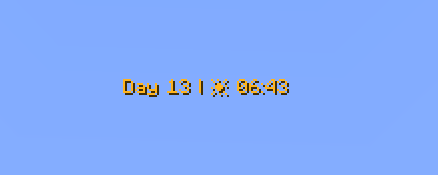
Shows the current in-game day number. Toggle the Day prefix on or off to suit your style.

Weather Indicator

Displays the current weather in one of two modes:

Icon mode (default) — uses intuitive icons:

Text mode — displays weather as plain text:

Hidden automatically in the Nether and End, where weather doesn't apply.

Clock

Displays the current in-game time in two available formats:

Coordinates (hidden by default)

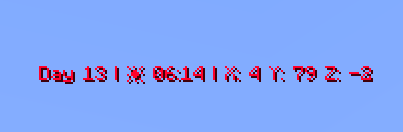
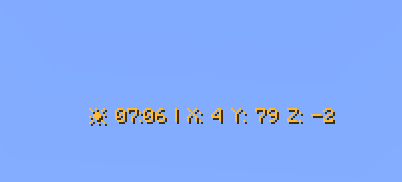
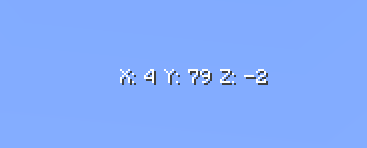
Shows your current X, Y, Z position. Toggle the coordinate prefix on or off independently.

Facing Direction (hidden by default)

Shows which direction you're currently looking. Supports full names (e.g. West), abbreviated names (e.g. W), and optional intercardinal directions (e.g. North-East / NE).

Player Head (hidden by default)

Displays your player head icon inside the action bar for a personalized touch.


Dynamic Gradient Color System

The action bar text color smoothly transitions based on the in-game time shown on the clock. The chart below shows the full 24-hour color cycle:

Action bar dynamic gradient text color adjustment chart.

00:00 → 04:00 — Deep purple/indigo (late night) 04:00 → 08:00 — Warm golden yellow (sunrise) 08:00 → 12:00 — Fading into bright white (morning) 12:00 — Pure white (noon peak) 12:00 → 16:00 — Shifting into warm orange (afternoon) 16:00 → 20:00 — Deep orange-red (sunset) 20:00 → 23:59 — Fading back to cool blue/purple (night)

Fun fact: Every single hour and minute has its own individually defined color — that's 1,440 unique color values declared in total!


Full Per-Player Customization

Every player can personalize their own action bar using /trigger commands — no operator permissions needed.

Sample settings

Available Commands

Command Description Default
/trigger version Display the current datapack version -
/trigger default Reset all settings to default -
/trigger random Randomize all action bar settings -
/trigger show Toggle the action bar on/off Shown
/trigger show_days Toggle the day counter Shown
/trigger show_weather_info Toggle the weather indicator Shown
/trigger weather_info_type Switch weather display mode Icon mode
/trigger show_clock Toggle the clock Shown
/trigger time_format Switch clock between 24h and 12h 24-hour
/trigger show_cordinates Toggle coordinates Hidden
/trigger show_days_prefix Toggle the "Day X" prefix text Shown
/trigger show_cordinates_prefix Toggle the coordinate prefix labels Shown
/trigger show_facing_direction Toggle the facing direction indicator Hidden
/trigger facing_direction_type Switch between full and abbreviated direction names Full
/trigger facing_direction_advanced Toggle intercardinal directions (e.g. North-East) Disabled
/trigger show_player_head Toggle the player head icon Hidden
/trigger dynamic_clock_color Toggle the dynamic gradient color Enabled
/trigger set_color Set a static solid color (requires dynamic color OFF) Default color
/trigger text_style Set the text formatting style Default
/trigger separators Change the separator character between elements
/trigger external_separators Change or enable outer separators at start/end of bar Disabled
/trigger display_order Change the display order of elements Default

Weather Display Mode (/trigger weather_info_type)

Clock Format (/trigger time_format)

Facing Direction Type (/trigger facing_direction_type)

Intercardinal Directions (/trigger facing_direction_advanced)

Text Style (/trigger text_style)

Choose from 13 formatting styles for the action bar text:

Separator Picker (/trigger separators)

Change the character that separates elements in the action bar.

See the full separator palette on the website

Outer Separator Picker (/trigger external_separators)

Add decorative separators at the very beginning and end of the action bar.

Display Order (/trigger display_order)

Rearrange the order in which elements appear in the action bar.

Static Color Picker (/trigger set_color)

When dynamic color is disabled, choose from 64 handpicked colors organized by palette:

White (1–6)Red (7–11)Orange (12–15)Yellow (16–21)Green (22–28)Cyan (29–32)Blue (33–42)Purple (43–47)Pink (48–52)Brown (53–56)Other (57–64)

See the full color palette on the website


Quick Command Reference

All commands follow the same toggle/set pattern:


Credits

Creator: MrKazanek

Thank you to everyone who supported this project! ❤️

Verified by MCModsHub

These come from our own check of the pack file, not from the source page.

Explore more