
Shimmer - Uncrafting Table
Shimmer is a data pack inspired by the Shimmer liquid in Terraria. It enables players to uncraft items whether in vanilla or modded gameplay, only by…
⬇ Download on Modrinth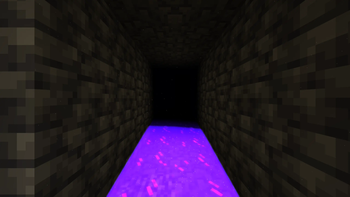
Shimmer
Shimmer is a data pack inspired by the Shimmer liquid in Terraria. It enables players to uncraft items whether in vanilla or modded gameplay, only by dropping them into a source water block near the bottom of the Overworld which is continually glowing and has stars twinking in the dark. The same ZIP file also contains an optional resource pack for Minecraft 1.21.11 to 26.3 snapshot-3.
Installation
Data Pack
Place the Shimmer ZIP file in your world's datapacks folder. Do not extract it for a normal installation.
.minecraft/saves/<world>/datapacks/<Shimmer ZIP file>
The included uncrafting data was generated for vanilla Minecraft 1.21 and later. No additional setup is required. If you have some recipes involving modded items, or you are playing with some custom recipes from other data packs, or a later Minecraft version adds or changes crafting recipes, regenerating the uncrafting data is only necessary when you want Shimmer to use those new or changed recipes.
Resource Pack
The same ZIP file can also be used as a resource pack, but the resource-pack content supports only Minecraft 1.21.11 and later. Installing it as a resource pack does not install the data pack, so use a second copy of the ZIP if you want both parts enabled.
If you want only a resource pack version, go to Shimmer - Resource Pack.
Global Installation
This method enables the resource pack from the Resource Packs menu and makes it available to every world.
- Open Options → Resource Packs → Open Pack Folder.
- Place the Shimmer ZIP file directly in the opened
resourcepacksfolder. Do not extract or rename it. - Return to Minecraft and move Shimmer into the selected resource packs list.
The resulting path is:
.minecraft/resourcepacks/<Shimmer ZIP file>
Installation for One World
Use this method when distributing a map or when the resource pack should load automatically only for one world. Use a second copy of the ZIP and rename that copy to resources.zip.
For Minecraft 1.21.11 through 26.1 Snapshot 5, place resources.zip directly in the world folder, next to level.dat and the datapacks folder:
.minecraft/saves/<world>/resources.zip
For Minecraft 26.1 Snapshot 6 and later, create a resourcepacks folder inside the world folder and place resources.zip there:
.minecraft/saves/<world>/resourcepacks/resources.zip
Do not place the only copy of the pack in the world-resource-pack location. The ZIP must still also be present in the world's datapacks folder for Shimmer's data-pack functions to work.
Updating Shimmer for Another Minecraft Version or Modded Items
Shimmer's uncrafting functions are generated from Minecraft's recipe and item-tag data. To use the pack with another version, first regenerate those functions from that version's game JAR.
Extract the Shimmer ZIP file.
Locate the target version's Minecraft game or mod
.jarfile and extract it.Delete the existing contents of
config/recipeandconfig/itemin the extracted Shimmer folder.Copy the contents of
data/minecraft/recipefrom the game JAR intoconfig/recipe.Copy the contents of
data/minecraft/tags/itemfrom the game JAR intoconfig/item.Apply the command changes for your target version described below.
From the root of the extracted Shimmer folder, run:
python config/generate_uncraft.pyCompress the contents of the Shimmer folder into a new ZIP file. Make sure that
pack.mcmeta,data, andconfigare directly inside the ZIP rather than inside an additional outer folder.
Features
- Shimmer — Source water blocks between Y=-64 and Y=-54 in the Overworld act as Shimmer.
- Uncrafting — Drop a supported item into Shimmer to recover ingredients from its crafting recipe. The source water block is consumed when uncrafting succeeds.
- Custom recipe support — Replace the files in
config/recipeandconfig/itemwith recipe and item-tag data from another data pack or mod, then runconfig/generate_uncraft.pyto rebuild the uncrafting functions. - More Shimmer mechanics planned — Future updates may add more mechanics found in Terraria's Shimmer, including material transmutation, new items, and other related features.
Limitations
- When a recipe accepts an item tag, Shimmer returns the first valid item listed by that tag because Minecraft does not preserve which tagged ingredient was originally used.
- Milk buckets and honey bottles are treated as non-returnable ingredients.
- Items with stored components are checked before component-free variants, but exact component equality cannot always be guaranteed by vanilla NBT matching.
- The generator processes shaped and shapeless crafting recipes only. Stonecutting and other recipe types are ignored.
Reporting Bugs
Open the Issues tab and select New issue. Include:
- The Shimmer version
- The Minecraft version
- Any other installed data packs or mods
- Steps that consistently reproduce the problem
- Relevant screenshots, videos, logs, or command output
License and Credits
Shimmer is free software licensed under the GNU General Public License version 3 only (GPL-3.0-only).
Copyright © 2026 ZhuinZ and Shimmer contributors.
Minecraft is a trademark of Microsoft Corporation. Terraria is a trademark of Re-Logic.
NOT AN OFFICIAL MINECRAFT PRODUCT. NOT APPROVED BY OR ASSOCIATED WITH MOJANG OR MICROSOFT.
- Edition: Minecraft Java
- File type: .zip (resource pack)
- Minecraft versions listed: 24w18a, 24w19a, 24w19b
- How to install: Download the .zip resource pack — do not unzip it. → Put it in .minecraft/resourcepacks. → Enable it in Options → Resource Packs.
- Where to get it: Opens on Modrinth — not every file is mirrored on our own servers.
Install steps are the general flow for this file type — How to install Minecraft Java resource packs walks through it step by step.
- Downloads as §b§lShimmer §rv1.1.2 §6by ZhuinZ.zip
- Download size: 1.9 MB
- Download link checked 12 Sept 2026 — working
These come from our own check of the pack file, not from the source page.