
VotePoll
Java mod listed for Minecraft 1.21. Downloads from the MC Java Mods app on Android.
⬇ Download on Modrinth
VotePoll
VotePoll is a simple Minecraft plugin that lets players vote through an interactive GUI instead of using complicated commands. Players simply open the menu, click their preferred option, and their vote is saved automatically.
Features
- Simple and interactive voting GUI
- Add or remove voting options anytime
- Live vote counter displayed on each option
- One vote per player for each poll
- Automatically saves all options and votes after server restarts
- Admin commands protected by a permission node
Commands
Player Commands
| Command | Description |
|---|---|
/vote |
Opens the voting menu. |
Admin Commands (votepoll.admin)
| Command | Description |
|---|---|
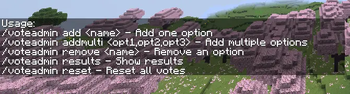
/voteadmin add <name> |
Add a new voting option. |
/voteadmin addmulti <option1,option2,option3> |
Add multiple voting options at once. |
/voteadmin remove <name> |
Remove a voting option. |
/voteadmin results |
View the current voting results. |
/voteadmin reset |
Reset all votes and start a new poll. |
Example Usage
Create a poll by adding options:
/voteadmin add Survival
/voteadmin add SkyBlock
/voteadmin add BedWars
Or add multiple options in one command:
/voteadmin addmulti Survival,SkyBlock,BedWars
Players can then open the voting menu using:
/vote
A GUI will appear showing all available options. Players simply click the option they want to vote for.
Each player can vote only once per poll. To start a new poll, an admin can reset the votes:
/voteadmin reset
Permissions
| Permission | Description |
|---|---|
votepoll.admin |
Grants access to all admin commands. |
Compatibility
- Server Software: Paper / Spigot
- Minecraft Version: 1.21+ (change this if your plugin supports other versions)
- Edition: Minecraft Java
- File type: .jar
- Minecraft versions listed: 1.21, 1.21.1, 1.21.2
- How to install: Install the matching mod loader (Forge, Fabric or NeoForge) for your Minecraft version. → Download the .jar. → Put it in the .minecraft/mods folder and launch that loader profile.
- Where to get it: Opens on Modrinth — not every file is mirrored on our own servers.
Install steps are the general flow for this file type — How to install Minecraft Java mods & modpacks walks through it step by step.
- Ships as VotePoll.jar — drop this file into the mods folder
- Download size: 12 KB
- Download link checked 2 Oct 2026 — working
These come from our own check of the pack file, not from the source page.